
RedBeanPHP is a powerful, zero config
object relational mapper.
Update 2026: Improved PHP 8.5 compatibility!
Test Server: Online CI/CD has some issues (with latest PHP and oldest PHPs) but don't worry
RedBeanPHP is also tested on our local servers and works with PHP 5.2 - PHP 8.5!
: RedBeanPHP 5.7.6 Latest
: RedBeanPHP 5.7.5
: Added PHP 8.3 to Travis-CI test matrix
: RedBeanPHP 5.7.4
: RedBeanPHP 5.7.3
: RedBeanPHP 5.7.2
: RedBeanPHP 5.7.1
: RedBeanPHP 5.7
: RedBeanPHP 5.6
: RedBeanPHP 5.5
: RedBeanPHP 5.4
: RedBeanPHP 5.3
: RedBeanPHP 5.2
: RedBeanPHP 5.0
Let's import a CSV of country codes in just about a minute, including the time to download and
install RedBeanPHP!
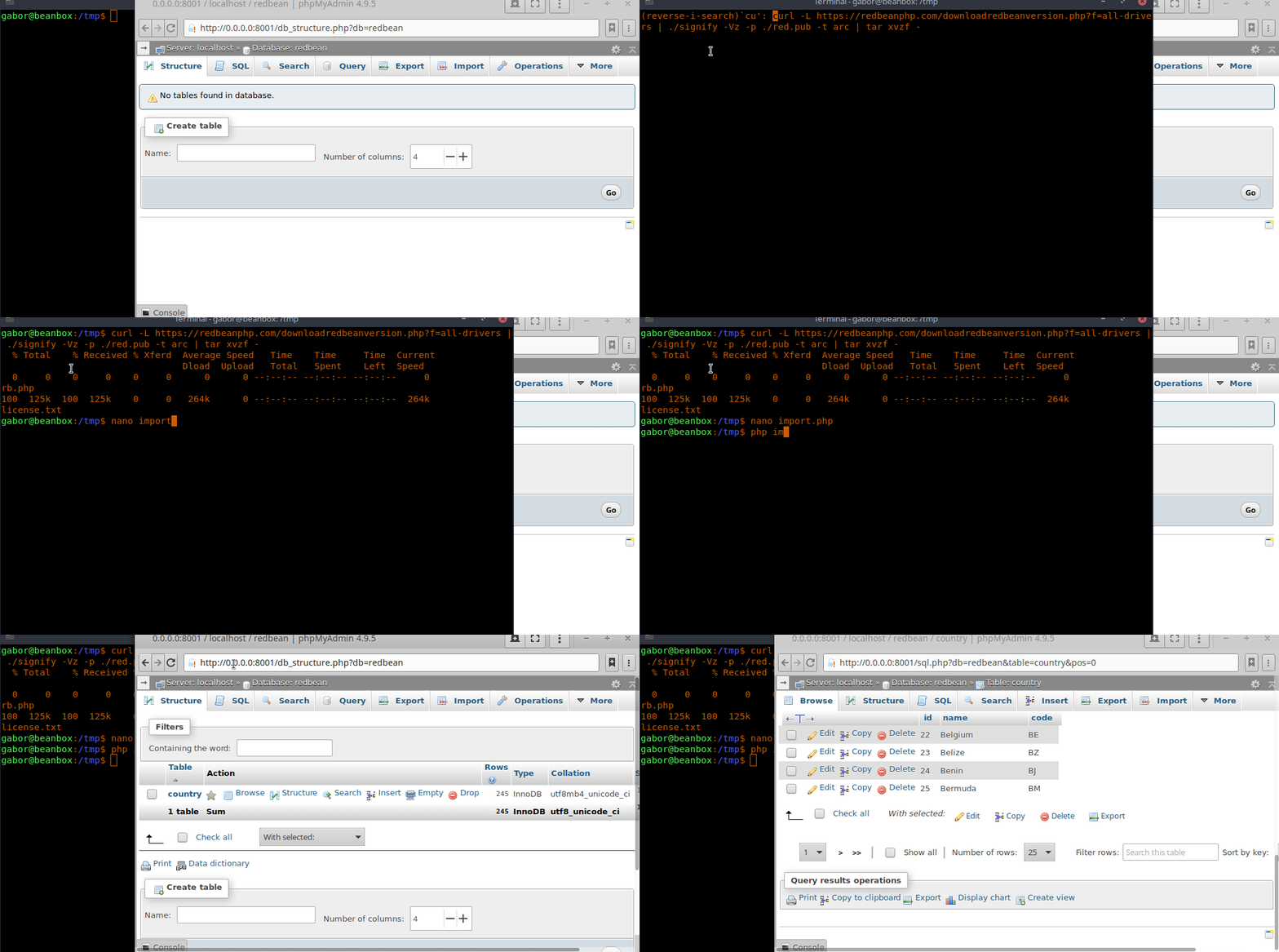
With RedBeanPHP you don't need to design your database schema upfront, you don't need
a database administrator, you don't need endless configuration files in yaml, xml or json,
you don't need hundreds of untrusted dependencies or a sluggish framework, just one file and go!
This is how you do CRUD in RedBeanPHP:
    require 'rb.php';
    R::setup();

    //for version 5.3 and higher
    //optional but recommended
    R::useFeatureSet( 'novice/latest' );

    $post = R::dispense( 'post' );
    $post->text = 'Hello World';

    //create or update
    $id = R::store( $post );

    //retrieve
    $post = R::load( 'post', $id );

    //delete
    R::trash( $post );
This automatically generates the database, tables and columns... on-the-fly. It infers relations based on naming conventions. RedBeanPHP also makes it very easy to work with trees in databases:
$pages = R::children( $site, $extraSQL );
RedBeanPHP uses recursive table expressions to deal with tree structures in your database to improve performance (to use this feature you need a database that supports RCTEs like MySQL 8.0.1+, MariaDB 10.2.2+ or PostgreSQL 9+). Learn more about RedBeanPHP trees.
In RedBeanPHP 5.3 and higher you can use R::useFeatureSet( 'novice/latest' ) to automatically select the latest features. If you are working on an older code base you can ommit this line. The latest keyword means that you want to use the latest features. The novice keyword means that some dangerous features like R::nuke() will be turned off. You can also specify a specific RedBeanPHP version like 5.3 (minimum).
No verbose XML files, no annoying annotations, no YAML or INI. Zero Config. Just start coding.
During development, RedBeanPHP will adapt the database schema to fit
your needs, giving you the NoSQL experience.
When deploying to production servers, you can freeze the schema and
benefit from performance gains and referential integrity.
RedBeanPHP offers the best of both worlds!
RedBeanPHP features:
auto-discovery of models, fast trees,
deep copying and smart import.
Write less, do more!
RedBeanPHP strives to support all ALL Free, Open Source databases.
Currently, RedBeanPHP supports:
MySQL, MariaDB, SQLite, PostgreSQL, CUBRID and Firebird/Interbase***.
RedBeanPHP supports PHP version HHVM, 5.2**, 5.3.0-5.3.2**, 5.3.3, 5.4, 5.5, 5.6, 6.0*, 7.0, 7.1, 7.2, 7.3, 7.4, 8.0, 8.1, 8.2, 8.3, 8.4 and 8.5 We take
backward compatibility very serious! RedBeanPHP has a track record of 20 years of
PHP language level compatibility without a single breaking change! You can trust RedBeanPHP.
*=partial (according to community)
**=requires patch
***=experimental
The library has been created in 2009 and
is now considered quite mature. No major bugs have been found since 2013 and
only minor features have been added in recent years. The code base is being
tested with every change, there are over 20338* unit tests (100% code coverage) for PHP 5.3-latest and all
supported databases. The project is
actively maintained and we take backward compatibility *very* serious.
The code is well-documented.
RedBeanPHP is trusted by many developers worldwide and has over 2.1 million installs on
packagist alone! (since 3.5)
and more than 2k stars on github, furthermore thousands of projects have RedBeanPHP as a dependency.
Signify keys and checksums are provided.
*=running the full (!) unit test suite
Download the easy-to-use one-in-all package, one single file containing the entire RedBeanPHP library!
No composer, no auto-loaders, no configuration, just download and run!
Go to the DOWNLOAD page and download to latest
version of RedBeanPHP!
Github repository: RedBeanPHP on Github.
Travis-CI Test Dashboard: RedBeanPHP on Travis.
API Documentation: RedBeanPHP API Documentation.
Community Forum: RedBeanPHP Community Forum.
Notice something strange? There is no cookie dialog on this site! That's because I don't track you in any way. I fully respect your privacy and I want to offer you a high-quality website without annoying ads. So, no ads, no cookies, no tracking pixels, no MBs of Javascript, not even server-side tracking, nothing! That keeps this website clean, very fast, secure and comfy to use. Hell! I don't even know how many visitors there are on this site! To help me keep this website this way, please consider becoming a sponsor of RedBeanPHP and have your company logo on the website! Contact me for more information.
RedBeanPHP is written by BDFL Gabor de Mooij and the RedBeanPHP community.
Welcome to the Download page of RedBeanPHP. Here you can download various editions of
RedBeanPHP.
RedBeanPHP ships as a single, all-in-one tarball, that's all you need to
get started with RedBeanPHP. Simply extract the tgz file to the
destination folder and include the
rb.php file in your PHP script.
For a list of new features, fixes and changes in the latest version, please consult the
changelog.
Did you check the system requirements?
The latest stable version of RedBeanPHP.
If you're new to RedBeanPHP this is the recommended version to use.
After downloading and extracting the file and
include the rb-file in your PHP
script.

...also see the changelog for details!
Here are the sha256sum outputs of the files:
85a7d1482912be263afe29e069cbbdcf2d64b7e07c961b060e5ea481ca8cf4b8  RedBeanPHP5_7_6-mysql.tgz
84d47122b2d2e049f4ac20bae5a31107ae71ed6e886b0c7d1981d5ee344afe7c  RedBeanPHP5_7_6-postgres.tgz
1e938c18b3f87daba85ad0e8c6eb8fad3154de567dc2bcf88bb894c0a72ba4d4  RedBeanPHP5_7_6-sqlite.tgz
629233b5a60229c0e4c6630114bed6075139de9c100070ced689b36a8e6c1719  RedBeanPHP5_7_6.tgz
signify key:
untrusted comment: signify public key
RWSEPjwPrf4jAtahiV/HNXWz83QYsppKn0EzVOhsoVV24gwB6mGpsdXL
Always make sure you check the sha256sum before including the file. Also make sure to check the signature!
Copy my public Signify-key from the above output and store it in a file called red.pub. To download and check the RedBeanPHP Signature in one go, use:
$ curl -L https://redbeanphp.com/downloadredbeanversion.php?f=all-drivers | signify -Vz -p ./red.pub -t arc | tar xvzf -RedBeanPHP packages are signed using the OpenBSD Signify software (Linux version, macos version, Windows version).
If you use PHP 5.3.3 or older, run the P533 patch first. Download the P533-patch for old PHP versions.
It's still possible to download older versions of RedBeanPHP from the
RedBeanPHP
Download Archives.
Feel free to visit the download archives and find
one of the previous versions of RedBeanPHP.
I no longer answer questions regarding RedBeanPHP 4 and older.
These versions have been deprecated since January 2021.
In this Quick Tour we will show you
how to use RedBeanPHP and highlight some of its features.
Because your time is precious, the Quick Tour is very brief and should only take about
5 minutes to walk through...
Have an associative array in PHP? You can store an entire array structure (even from a form) in one line:
    R::store(R::dispense([
        '_type' => 'book',
            'title' => 'My Book',
            'ownPageList' => [
                    ['_type'=>'page', 'name'=>'first page']
            ]
    ]));
This creates a book table with one entry called 'My Book' and a related page (using proper foreign keys). ...8...9...10. :)
To begin with RedBeanPHP, download the package from the website and put in somewhere in your PHP project (check the signature).
Now, before you begin you have to include RedBeanPHP in your project, to do so, add a line like this:
require 'rb.php';
Now you have to setup your database connection.
If you just want to play with RedBeanPHP you may also use:
R::setup();
This will create a simple, temporary SQLite database, after rebooting your system this database will be gone.
For Windows users: make sure PHP has write access to C:\Windows\Temp.
If you want to start using RedBeanPHP for real, you can connect to a MySQL database like this:
R::setup( 'mysql:host=localhost;dbname=mydatabase', 'myusername', 'mypassword' );
Now you're ready to start using RedBeanPHP. RedBeanPHP makes it really easy to store stuff in the database. For instance, to store a blog post in the database you write:
    $post = R::dispense( 'post' );
    $post->title = 'My holiday';
    $id = R::store( $post );
Now, RedBeanPHP will create a table called post for you in the database and add
a column called title, big enough to hold your text.
The store() function will also
return the primary key ID of the record, which we capture in the variable $id.
RedBeanPHP automatically creates a column for your property, in this case 'title'. RedBeanPHP determines the column type by scanning the value in the property. For instance in this case the value is a small text, so RedBeanPHP will add a column of type VARCHAR (assuming this is a MySQL/MariaDB database). Imagine you store a large text in this property later, then RedBeanPHP will change the column type to TEXT to make room for the new value. This is called fluid mode. In fluid mode, RedBeanPHP will adapt the database to meet the requirements of your app. It will never throw away columns though nor will it ever shrink the size of a column, so you don't have to worry about data loss. If you want to clean up your database by removing columns you have to do this manually. Some datatypes are immutable, for instance if you store an ISO date string in a property (2005-01-01), RedBeanPHP will create a date column for you. However in this case, the date column will not change (to TEXT for example). This is because we consider it unlikely you ever want to change a date column into something else (like a TEXT column). If you try to put an invalid date string into this column RedBeanPHP assumes it's by accident.
Note that you don't need any configuration to make this work. RedBeanPHP is
configurationless, everything just works out of the box.
You also don't need to configure paths or autoloaders because
everything is just in one file!
You don't even have to instantiate an object, all methods in RedBeanPHP are static.
Just type R:: and then the name of the method you want to use!
To load the post you just saved, just pass the ID to the load function:
$post = R::load( 'post', $id );
If you want to lock a bean while loading it, so nobody can change
the record associated with your bean until your transaction completes use
R::loadForUpdate()/R::findForUpdate() instead (version 5+).
You can also use SQL snippets like ' for update '
with operations like R::find() and R::batch(). Before invoking these commands
just set the SQL snippet you wish to use:
R::getWriter()->setSQLSelectSnippet( ... );
Yep, there's your post again. To echo the title of your post:
echo $post->title;
Nothing fancy there, but did you know beans can also be treated like arrays ?
echo $post['title'];
To delete your post, pass it to the trash method:
R::trash( $post );
Now, the post is gone, it will no longer be available in your database.
Finding stuff in the database is easy:
    $posts = R::find(
    'post', ' title LIKE ?', [ '%holiday%' ] );
This will search for all posts have the word 'holiday' in the title and will
return an array containing all the relevant beans as a result.
As you see, we don't use a fancy query builder, just good old SQL.
We like to keep things simple.
Besides using the find() functions, you can also use raw SQL queries:
    $books = R::getAll(
    'SELECT * FROM book WHERE price < ? ',
    [ 50 ] );
RedBeanPHP also makes it easy to manage relations. For instance, if we like to add some photos to our holiday post we do this:
    $post->ownPhotoList[] = $photo1;
    $post->ownPhotoList[] = $photo2;
    R::store( $post );
Here, $photo1 and $photo2 are also beans (but of type 'photo').
After storing the
post, these photos will be associated with the blog post.
To associate a bean you
simply add it to a list.
The name of the list must match the name of the related bean type.
So photo beans go in:
$post->ownPhotoList
comments go in:
$post->ownCommentList
and notes go in:
$post->ownNoteList
See? It's that simple!
To retrieve associated beans, just access the corresponding list:
    $post = R::load( 'post', $id );
    $firstPhoto = reset( $post->ownPhotoList );
In the example above, we load the blog post and then access the list. The moment we access the ownPhotoList property, the relation will be loaded automatically, this is often called lazy loading, because RedBeanPHP only loads the beans when you really need them.
To get the first element of the photo list, we simply use PHP's native reset() function...
$firstPost = reset( $post->ownPhotoList );
Although no SQL is necessary, RedBeanPHP is very SQL friendly. For instance, suppose some of your posts have quite a big photo collection associated with it and you want to limit the number of photos to a maximum of 3:
$threePhotos = $post->with( 'LIMIT 3' )->ownPhotoList;
See? Just pass a little SQL Snippet!
As you have seen, RedBeanPHP dynamically changes the structure of the database during development. This is a very nice feature, but you don't want that to happen on your production server! So, before deploying your app, be sure to freeze the database by adding the following line just below the setup:
R::freeze( TRUE );
Before you deploy, review your database schema. RedBeanPHP tries to make a good database schema for
you, but you might want to improve it.
Maybe you added a column you no longer use, or you want an extra index.
Always make sure you review the final database schema before you put it on a production server!
After freezing the database, RedBeanPHP will
no longer change the structure, so you have the best of both worlds. NoSQL-like flexibility during development and
a reliable schema on your production server!
This was just a quick tour, showcasing some basic usage of RedBeanPHP. For more details please explore the documentation on this website!
Short version first... minimal requirements
RedBeanPHP
requires PHP 5.3.4 or higher.
RedBeanPHP is works on both ZEND PHP and HHVM.
RedBeanPHP also works with PHP 7.
You can also use RedBeanPHP with PHP 5.3 - 5.3.3, just make sure
you run the p533 patch first.
PHP 5.2 and earlier are not supported by RedBeanPHP. If you
happen to work with PHP 5.2 or earlier it's recommended to upgrade to a
newer version of PHP.
PHP 6.0 is also not supported, since this version has never
been officially released. Still, some people have been e-mailing me about
PHP 6.0. Although RedBeanPHP officially does not support this version, it is
said to work 'reasonably'.
RedBeanPHP works on all well known operating systems, including
GNU/Linux, BSD and Mac OSX.
You need to have PDO installed and you need
a PDO driver for the database you want to connect to. Most PHP stacks
already take care of this.
RedBeanPHP also requires the MB String extension, once
again, chances are, this is already there.
RedBeanPHP supports all well known, open source, relational databases. Official support is provided for: MySQL, MariaDB, PostgreSQL, SQLite, CUBRID and Firebird/Interbase (experimental). Support for other databases might be provided by 3rd parties.
RedBeanPHP does not work with MySQL strict mode. To turn off strict mode execute the following SQL query:
SET @@global.sql_mode= '';
RedBeanPHP has been designed to build your database on-the-fly, as you go. Afterwards, you can manually change the schema to suit your needs (change column types, add additional indexes). Remember that the purpose of RedBeanPHP is to have an easy, configuration-less ORM. This can be achieved only by respecting certain conventions.
Did you check your system requirements? Proceed to download RedBeanPHP.
Installing RedBeanPHP is very easy. First of all, you need to download the tarball from our server. Just head over to the download section and click on the download link to start downloading the package. You can also use a tool like wget of course.
This will automatically download RedBeanPHP, verify the signature and (see download page) and extract the contents of the package.
url=http://www.redbeanphp.com/downloadredbean.phpRedBeanPHP is always distributed as a TGZ package, also known as a 'tarball'. To extract the contents of this package use:
tar xvf redbeanphp.tar.gzYou'll then see...
license.txtOPTIONAL Check integrity:
sha256sum redbean.tgzNow compare the output of that command with the SHA signature shown on the download pages.
OPTIONAL Check authenticity (public keys available on download page and groups forum):
cat redbean.tgz | signify -Vz -p red.pub -t arc | tar xvzf -Inside the package you'll find a license.txt and a rb.php file. The first file contains the license information. The second file is the compiled RedBeanPHP all-in-one script. All RedBeanPHP code has been combined into a single file for your convenience.
To include RedBeanPHP in your project, simply copy the file to a location somewhere inside your PHP project and then use the PHP 'require' command to load it:
require 'rb.php';
You are now ready to use RedBeanPHP!
Let's try to setup
a database connection!
This patch is only required for people using old versions of PHP, i.e. PHP 5.3.3 or earlier. If you are running a PHP instance with a higher version number please skip this section. People using PHP version 5.3.3 or older should run the p533patch.php file first and then include the newly generated rb-p533.php file. The patch will modify the source for compatibility with these older PHP editions. Use the patch like this:
php p533patch.phpYou will now see the following output:
Running Patch P533...After running the patch, you'll see a new file in your folder:
rb-p533.phpThis is the file to be used with your version of PHP.
Composer is not the preferred way to install RedBeanPHP and never will be. Using package management systems for
development can be dangerous because people can inject malicious dependencies or remove dependencies.
Related news items:
Malicious code snuck into in Python repository
The "Left-pad" incident at NPM
Arch-linux incident
To install RedBeanPHP with Composer... Just open your composer.json file and add the package name (e.g. "gabordemooij/redbean": "dev-master") in your require list.
{..for more details on Composer based installation see the readme on github.
To connect to an SQLite testing database, without having to make one yourself, use:
    require 'rb.php';
    R::setup();
On most systems, this just works.
This code creates a test database in your /tmp folder.
Of course, this is meant for testing purposes only
(and to fool around),
to connect to a real database, use one of the following snippets:
For Windows: make sure PHP has write access to C:\Windows\Temp.
MariaDB (formerly known as MySQL) is the most popular database among web developers. Use MariaDB or MySQL for light web development. To connect to a MySQL database or a MariaDB database:
    R::setup( 'mysql:host=localhost;dbname=mydatabase',
        'user', 'password' ); //for both mysql or mariaDB
Did you manage to establish a connection to the database? Proceed to learn the basics of RedBeanPHP!
Did you receive a connection error?
Note that PDO errors are not passed to the client as under certain circumstances they can reveal secrets (such as passwords). To see exact error messages you must create a direct PDO connection without RedBeanPHP. A sample is shown below:
    try{
        $db = new PDO('mysql:host=HOSTNAME;dbname=DB_NAME','USERNAME','PASSWORD');
    } catch(PDOException $e){
        echo $e->getmessage();
    }
Postgres evolved from the classic Ingres database and is by far the most advanced database you can get. Use Postgres for serious application development. Postgres is rock solid and has lots of power features like window functions, support for hierarchical queries and materialized views. To connect to a PostgreSQL database:
    R::setup( 'pgsql:host=localhost;dbname=mydatabase',
        'user', 'password' );
SQLite is file based database, ideal for embedded applications, prototyping, small (and smart) applications, small websites (not too much traffic) and data analysis. To connect to an SQLite database:
R::setup( 'sqlite:/tmp/dbfile.db' );
CUBRID is an exciting database platform focusing on web development. It's an ideal replacement for rusty MySQL servers. While CUBRID seems to be almost completely compatible with MySQL it also offers a great deal of advanced features, like hierarchical queries and click counters. However, CUBRID also offers a very complete, easy-to-use GUI based toolchain. To use the CUBRID database with RedBeanPHP4, first install the plugin pack. To connect to a CUBRID database:
    R::setup('cubrid:host=localhost;port=30000;
    dbname=mydatabase',
    'user','password');
To disconnect use:
R::close();
This will close the database connection.
 In this tutorial we're going to write a little
application to demonstrate some basic features of RedBeanPHP.
Instead of a boring todo app, we'll write a little application
to manage whisky tasting notes. We call this application
'dram'
which is 'a small glass of whisky'.
In this tutorial we're going to write a little
application to demonstrate some basic features of RedBeanPHP.
Instead of a boring todo app, we'll write a little application
to manage whisky tasting notes. We call this application
'dram'
which is 'a small glass of whisky'.
We'll build a CLI application. This means we don't create a graphical user interface. Our application will run on the command line. This allows us to focus solely on the program code without having to bother with things like HTML templates. We also assume you're using a UNIX or GNU/Linux operating system.
First, we need to download and install the RedBeanPHP package. Luckily, this is a no-brainer. RedBeanPHP is distributed as a single file which we just grab from the internet like this:
url=http://www.redbeanphp.com/downloadredbean.phpHere we download the RedBeanPHP package from the RedBeanPHP servers. We then extract the contents of the tarball. RedBeanPHP is always distributed as a single tarball containing the single code file. The code file inside the tarball is named:
rb.php
For this tutorial, we'll use a temporary database, so after rebooting
your system, the data will be gone.
While not very practical in real life, this
is ideal for testing and playing with RedBeanPHP.
So, let's create our application, the dram.php file:
...and we're going to edit it using our favourite editor...
vim dram.php
I like to use VIM but that's of course just a matter of choice.
Any plaintext editor would do fine of course.
Now, let's require the RedBeanPHP library file and setup our
database connection:
    require 'rb.php';
    R::setup();
That's all, we're now ready to start coding now.
When working with RedBeanPHP, it's important to start by creating
records first. So first write your logic for adding records to the database.
Some people like to begin by
creating an overview page listing all the records in a table,
however this means your database
must already contain at least some data.
Since we like RedBeanPHP to do all the
heavy lifting for us, including table and column creation,
we better start the other way around, by adding records.
So, always start with your 'add' code.
$opts = getopt( '', [ 'add:', 'list' ] );
We use the getopt() function of PHP to read commands
from the console.
In this case we listen for two commands: add and list.
Now let's see how we add a bottle of whisky to our collection:
    if ( isset( $opts['add'] ) ) {
    $w = R::dispense( 'whisky' );
    $w->name = $opts['add'];
    $id = R::store( $w );
    die( "OK.\n" );
    }
This code works very simple: it takes the value of the add parameter from the command line and creates a new bean of type whisky. It then puts the text in the name property of the bean and stores it. To make it possible for our users to view the whisky menu we also implement a list feature:
    if ( isset( $opts['list'] ) ) {
          $bottles = R::find( 'whisky' );
          if ( !count( $bottles ) )
            die( "The cellar is empty!\n" );
          foreach( $bottles as $b ) {
            echo "* #{$b->id}: {$b->name}\n";
          }
      exit;
    }
We can now use the application like this:
php dram.php --add="Bowmore 12yo"...and to view the list...
php dram.php --listThat's already quite a fancy application in just a couple of lines. But we can do more! However, before we continue, let's take a look at the database. Before we began, it was empty, but now we see this:
geek@beans$ sqlite3 /tmp/red.dbWe see the whisky table has been created. The required columns are there as well:
sqlite> .schemaRedBeanPHP creates the necessary tables and columns automatically. The type of the column in the database depends on the value you want to store in it. RedBeanPHP scans the value you want to store in a column and makes sure the column has a type that can contain your data properly. You can always tune your database schema manually of course.
We are now going to add a new feature: 'delete'. Not suprising, the delete command will remove a specific record from the database. First we add the 'delete' command to getopts, so our application can recognize this command:
$opts = getopt( '', ['add:', 'list', 'delete:' ] );
Next, we write a little code to perform the actual deletion:
    if ( isset( $opts['delete'] ) ) {
    R::trash( 'whisky', $opts['delete'] );
    die( "Threw the bottle away!\n" );
    }
Nice, so we can now add, list and delete whiskies! Let's give it a try!
php dram.php --add="daluaine 16yo"Oops, a typo, it's Dailuaine not Daluaine. A delicious whisky by the way. Thanks to our new delete function, we can now remove this faulty record and correct our silly mistake:
php dram.php --delete=3Now this is all nice and fun but where are the notes? It's supposed to be a tasting notes app after all? So, let's add the notes before the Haggis gets cold!
Let's first consider the relation between a tasting note and
a bottle of whisky. A whisky bottle can have many tasting notes, yes?
Right, so what about the other way around? Can one tasting note
belong to many whiskies? Unlikely, since we consider every whisky to have
a unique taste (except the very cheap stuff maybe).
This means we need a one-to-many
relation here.
One whisky has many notes, each of these notes belongs to one whisky.
This kind of relation is sometimes expressed as: 1-N.
Now, when we throw away a bottle of whisky because we are no longer interested in it,
should we keep the corresponding notes? No! of course not! The notes themselves are not of
any interest, they only matter in relation to the whisky they describe. This means we have
to use an exclusive own list: xownNoteList. We relate the note and the whisky like this:
    $n = R::dispense( 'note' );
    $n->note = $text;
    $whisky->xownNoteList[] = $n;
    R::store( $whisky );
Note that the name of the list contains the type of bean we're storing in it. This is by convention. The format for a list is:
<x> own <BEAN TYPE NAME> ListSo if we want to store pages in a book we use ownPageList. Because we want to throw the notes away with the bottle, we use an exclusive list. Therefore we begin the name of this list with an 'x'. Once an exclusive list has been defined, there is no way back. If you want the notes to stay after all, you'll have to open your database management tool (phpmyadmin) and change the foreign key setting.
Now, let's make a feature for our users to list all the notes attached to a certain bottle of whisky:
    $notes = $whisky->xownNoteList;
    foreach( $notes as $note ) echo $note->note;
Now let's take a look at the whole application, here is my version:
    require 'rb.php';
    R::setup();
    $opts = getopt( '', [
      'add:',
      'delete:',
      'attach-to:',
      'note:',
      'notes:',
      'remove-note:',
      'list' ] );
    if ( isset( $opts [ 'add' ] ) ) {
      $w = R::dispense( 'whisky' );
      $w->name = $opts['add'];
      $id = R::store( $w );
      die( "OK.\n" );
    }
    if ( isset( $opts['delete'] ) ) {
      R::trash( 'whisky', $opts['delete'] );
      die( "Threw the bottle away!\n" );
    }
    if ( isset( $opts['note'] ) && isset( $opts['attach-to'] ) ) {
      $w = R::load( 'whisky', $opts['attach-to'] );
      if (!$w->id) die( "No such bottle.\n" );
      $n = R::dispense( 'note' );
      $n->note = $opts['note'];
      $w->xownNoteList[] = $n;
      R::store( $w );
      die( "Added note to whisky.\n" );
    }
    if ( isset( $opts['notes'] ) ) {
    $w = R::load( 'whisky', $opts['notes'] );
    foreach( $w->xownNoteList as $note ) {
    echo "* #{$note->id}: {$note->note}\n";
    }
      exit;
    }
    if ( isset( $opts['remove-note'] ) ) {
    R::trash( 'note', $opts['remove-note'] );
      die( "Removed note.\n" );
    }
    if ( isset( $opts['list'] ) ) {
     $bottles = R::find( 'whisky' );
    if ( !count( $bottles ) ) die( "The cellar is empty!\n" );
    foreach( $bottles as $b ) {
    echo "* #{$b->id}: {$b->name}\n";
    }
    exit;
    }
Here is how to use it:
php dram.php --add="Dailuaine 16yo"Just for fun, we're going to add a model. In many web application using the MVC pattern, models are used to encapsulate the business rules. Now let's say we don't accept tasting notes containing less than four characters. This qualifies as a business rule in the drinking business :). To add this validation rule we need to have a model. In most object relational mappers this is why you have to create a whole class first. In RedBeanPHP we like to things a little different. We have no models remember? Just beans. So, how do we go from a bean to a model ? Simple, we just add a model and RedBeanPHP will automatically detect its presence. Based on the naming convention it will connect the model to the bean. Here we go:
    class Model_Note extends RedBean_SimpleModel {
        public function update() {
        if ( strlen( $this->bean->note ) < 4 )
        die( "Note is too short!\n" );
        }
    }
You can also use \RedBeanPHP\SimpleModel.
Within the note model we can refer to our bean using:
$this->bean;
The update() method will be invoked by the bean once we try to store it. There is no way to stop the code flow though, to prevent RedBeanPHP from storing the bean we have to throw an exception, or issue a die() statement. Let's test it:
php dram.php --attach-to=4 --note="ap"Nice! That works really well! See? We did not have to change our code, simply add models whenever you like. No need to take all your code, put it in a class or add validation rules here and there, no, just add the model and suddenly all actions will flow through it. Besides update() we can use a lot of other 'hooks' to do all sorts of model stuff.
Before we deploy our application, we need to review the database and freeze it. To freeze the database we simply invoke the freeze() method on top of our code, just below the setup line:
    R::setup();
    R::freeze( TRUE );
That's it, we have our whisky app!
Of course there's much more to RedBeanPHP than just doing CRUD
and one-to-many relations, but it's
nearly impossible to fit all those features in a single tutorial.
Feel free to extend this little app
with tags, categories
and other concepts to explore all the other features RedBeanPHP has to offer. Enjoy!

 Besides the Quick Tour and the Tutorial
there are also a lot of video tutorials about RedBeanPHP on the web. Here is a selection.
Did you create a useful screencast on RedBeanPHP? Just drop me a link and I might add it here.
Besides the Quick Tour and the Tutorial
there are also a lot of video tutorials about RedBeanPHP on the web. Here is a selection.
Did you create a useful screencast on RedBeanPHP? Just drop me a link and I might add it here.
Note: these videos are hosted on external sites. Upon clicking on one of these videos you will be taken to an external site.









Have you created a RedBeanPHP video? Just notify me and I'll put it on this video page as well!
CRUD stands for Create, Update, Retrieve and Delete. CRUD operations are the core of many web applications.
RedBeanPHP works with beans. Most interactions with the database are
accomplished using beans. Beans are used to carry data from and to the database.
Every bean has a type and an ID.
The type of a bean tells you which table in the database is used to store the bean.
Every type maps to a corresponding table. The ID of a bean is the primary key
of the corresponding record.
You can create a new bean by dispensing one.
To create a new bean (of type 'book') use:
$book = R::dispense( 'book' );
You can now add properties:
    $book->title = 'Learn to Program';
    $book->rating = 10;
You can also use array notation if you like:
$book['price'] = 29.99; //you can use array notation as well
and store the bean in the database:
$id = R::store( $book );
At this point, the bean will be stored in the database and all
tables and columns have been created.
The bean will now have an ID, which is
also returned for your convenience.
RedBeanPHP will build all the necessary structures to store your data. However custom indexes and constraints have to be added manually (after freezing your web application).
TIP: If you start building an application with RedBeanPHP, the easiest way is to start with the add/update form, use R::load(bean, id) to either create (0) or update a record (id != 0) with a single form! Then use R::find() for the overview (in fluid mode it will not throw exceptions if the table does not exist yet). You can also use a special install url to prepare the database or take a look at RedSeed.
You can dispense any type of bean you like, as long as the type name consists of lowercase alphabetical characters:
    $page = R::dispense('page'); //valid
    $page = R::dispense( 'Page' ); //invalid: uppercase
    $page = R::dispense( 'cms_page' ); //invalid: _
    $page = R::dispense( '@#!' ); //invalid
However dispense also offers some shortcuts:
    $twoBooks = R::dispense( 'book', 2 );

    //Return an array with 2 beans
    $twoBooks = R::dispense( 'book', 2 );

    //Always returns an array with
    //$i beans even if $i=1
    $moreBooks = R::dispense( 'book', $i, TRUE );

    list($book, $page) = R::dispenseAll( 'book,page' );
    list($book, $pages) = R::dispenseAll( 'book,page*2' );
Properties of beans may contain alphanumeric characters and underscores. Camelcased properties will automatically convert to snake_case:
    $book->isSoldOut = TRUE; //is_sold_out
    $book->hasISBNCode = TRUE; //has_isbn_code
Do not use field names ending with _id, these are reserved for bean relations. Learn more... Other restrictions:
To load a bean, simply pass the type and ID of the bean you're looking for:
$book = R::load( 'book', $id ); //reloads our book
If the bean does not exist an empty bean with ID 0 will be returned.
By default RedBeanPHP returns only strings, to change this use:
R::getDatabaseAdapter()->getDatabase()->stringifyFetches( FALSE );
For MySQL you also need:
R::getDatabaseAdapter()->getDatabase()->getPDO()->setAttribute(PDO::ATTR_EMULATE_PREPARES, FALSE);
Locking (version 5+)
If you want to lock a bean while loading it, so nobody can change the record associated with your bean until your transaction completes use
R::loadForUpdate() (version 5+).
It's also possible to attach other kinds of SQL snippets along with the loading function, for instance to
make use of the lock-in-shared-mode feature of a database, you can attach a snippet like this:
R::load('bean', 1, 'LOCK IN SHARED MODE');
You can also use SQL snippets like ' for update '
with operations like R::find() and R::batch(). Before invoking these commands
just set the SQL snippet you wish to use:
R::getWriter()->setSQLSelectSnippet( ... );
Load Exceptions (version 5+)
If a bean does not exist, R::load() and R::loadForUpdate() will return an empty bean.
If there is an error because of a missing table or column, both methods will return an empty bean in fluid mode
and throw an exception in frozen mode.
If something else happens (lock timeout for instance) both methods will always throw an exception, even in fluid mode*.
*except for SQLite, because in fluid mode it's too difficult to separate error types.
To update a bean in the database, add or change properties:
    $book->title = 'Learn to fly';
    $book->rating = 'good';
    $book->published = '2015-02-15';
    R::store( $book );
Note that we added a new property 'published', RedBeanPHP will add a new column of type 'date' for this property. Also, it will widen the 'rating' from INTEGER to VARCHAR to support text as well as numbers.
    //Examples of other data types
    $meeting->when = '1995-12-05'; //Date
    $photo->created = '1995-12-05 19:00:00'; //Date time
    $meeting->place = '(1,2)'; //SPATIAL only works in postgreSQL
    $price->amount = '12.37'; //FIXED POINT NUMERIC - MySQL and Postgres
    $price->amount = '$25.00'; //MONEY TYPE - Postgres only
    $price->json = array( 'message' => 'hello' ); //JSON TYPE 5+
If you want a suitable data type of monetary values, use the 'XX.XX' format and you'll get a fixed precision number data field. To make use of Postgres special purpose, currency-aware money data type, prefix the value with a common currency symbol.
You might want to tweak ini_set('precision', ...) to set the number of significant digits displayed in floating point numbers.
You can use R::isoDate() and R::isoDateTime() to generate the current date(time) if you like. DateTime object are automatically converted to strings.
$meeting->when = DateTime('1995-12-05'); //Becomes string
As of RedBeanPHP 5.7.2 you can tell RedBeanPHP to automatically return a property value as an object (like DateTime) using the asClass() method, where 'Class' is the class you want to use to wrap the value in:
echo $meeting->asDateTime()->when->format('Y-m-d');
As of RedBeanPHP 4.1 you can also use spatial columns for MySQL, learn more.
As of RedBeanPHP 5 you can now use JSON columns. Arrays in bean properties will be automatically converted to JSON strings and the database Query Writer will automatically adjust the column type to JSON for you. To enable these features use: R::useJSONFeatures(TRUE); (by default these features are NOT active). JSON support should be considered experimental at this stage. JSON support is still very new, check whether your DB version supports this.
RedBeanPHP will dynamically add new columns to your database.
It determines the column type to use by looking at the value you are trying to store.
For instance, a short text might be stored as a VARCHAR
while a large text might be stored as TEXT.
Similarly, a boolean value will probably get stored as
TINYINT but when you put a float in that
property the column will probably be changed to FLOAT or DOUBLE
(depending on your database).
Some column types behave differently, for instance if you store a valid
ISO formatted date (i.e. 2015-01-01)
RedBeanPHP builds a DATE column, but this column will not change. In general, RedBeanPHP
tries to adapt the database to your application. If you're done developing, you can freeze the
database using the freeze() function. After that, the database schema will no longer change
(because it is very unlikely you want to store something other than a date in a column you filled with
perfectly formatted date in the first place).
Note that RedBeanPHP will never throw away columns or 'shrink' columns (from TEXT to VARCHAR)
to
avoid data loss. RedBeanPHP also only manipulates column types it recognizes, so if you change
a VARCHAR(255) to a VARCHAR(254)
it will leave that column alone, since it no longer recognizes the type.
This means that if you customize columns, RedBeanPHP leaves them alone from that point on.
If RedBeanPHP alters the database in a way you don't like, don't worry, you can always tune
the schema to your liking (just use your database management tool or phpmyadmin),
you can even freeze certain tables only.
To delete a bean:
    R::trash( $book ); //for one bean
    R::trashAll( $books ); //for multiple beans
To delete all beans of a certain type:
R::wipe( 'book' ); //burns all the books!
To destroy the entire database simply invoke the nuclear method (be careful!):
R::nuke();
To load a series of beans use:
$books = R::loadAll( 'book', $ids );
This will load all beans of type 'book' that have their id listed in the $ids list.
Similarly, you can use trashBatch to delete an entire collection of beans in one go:
R::trashBatch( 'book', $ids );
To quickly reload a bean:
$bean = $bean->fresh();
Instead of loading beans, you can also use the find() method to search for beans using certain criteria. Learn how to query beans in RedBeanPHP.
If you do not know the ID of a bean, you can search for beans using the find method:
$book = R::find( 'book', ' rating > 4 ');
The find() method uses good old SQL.
No fancy, custom query language — just plain old SQL.
The find operation in this example returns all beans of type book
having a rating of four stars or more.
The following example demonstrates how to use find() with bindings.
$books = R::find( 'book', ' title LIKE ? ', [ 'Learn to%' ] );
This find operation will return all beans of type 'book' having
a title that begins with the phrase: 'Learn to'.
If find() has no results it will return an empty array.
There is no need to use mysql_real_escape.
Always use the bindings.
PDO bindings do not work for tables
(see discussion here), however
if you wish to escape a table name you can use: R::getWriter()->esc( $tableName ).
Never put user input directly in your query!
To find and delete beans in one go:
    R::hunt( 'book',
    ' id IN ( '. R::genSlots( $ids ) .' ) ',
    $ids );
As of RedBeanPHP 5.2:
returns the number of beans deleted.
the SQL parameter is optional.
To use a 'SELECT-IN' style query use the R::genSlots function to generate the correct number of '?' slots:
    $promotions = R::find( 'person',
    ' contract_id IN ('.R::genSlots( $contractIDs ).')',
    $contractIDs );
If you want a single bean instead of an array, use:
$book = R::findOne( 'book', ' title = ? ', [ 'SQL Dreams' ] );
If no beans match the criteria, this function will return NULL.
As of 5.3 you can use explicit parameter binding if you like:
    $bean = R::findOne( 'bean', ' property = ? AND property2 = ? AND property3 = ? ', [
    $value,
    [ $value2, PDO::PARAM_INT ],
    [ $value3, PDO::PARAM_STR ]
    ]);
As of 5.6.3 you can use pstr( $str ) to generate [ $str, PDO::PARAM_STR ] for you and pint( $num ) to generate [ $int, PDO::PARAM_INT ] - these are just shortcut functions for your convience.
Use findAll if you don't want to add any conditions (but you want to order or limit... )
    $books = R::findAll( 'book' );
    $books = R::findAll( 'book' , ' ORDER BY title DESC LIMIT 10 ' );
If no beans match your criteria, this function returns an empty array.
All find methods: find, findOne and findAll also accept named slots:
$books = R::find( 'book', ' rating < :rating ', [ ':rating' => 2 ] );
Besides querying beans, you can also use regular SQL queries.
You can also use find with cursors:
    \R::getPDO()->setAttribute(PDO::MYSQL_ATTR_USE_BUFFERED_QUERY, false);
    $collection = R::findCollection( 'page', ' ORDER BY content ASC LIMIT 5 ' );
    while( $item = $collection->next() ) {
        ...
    }
Or directly
    R::getPDO()->setAttribute(PDO::MYSQL_ATTR_USE_BUFFERED_QUERY, false);
    $cursor = R::getCursor('SELECT * FROM `book` WHERE < :rating LIMIT 5', [ ':rating' => 2 ]);
    while($row = $cursor->getNextItem()){
        ...
    }
    //Reset will execute the query again
    $cursor->reset();
    $first = $cursor->getNextItem();

    $cursor->close();
The advantage of using a cursor is that the entire collection will not be loaded into memory all at once. This is handy for dealing with large bean collections.
To find a bean matching certain criteria, you can use R::findLike(). The following code returns all flowers that are either yellow OR blue:
    R::findLike( 'flower', [
        'color' => ['yellow', 'blue']
    ], ' ORDER BY color ASC ' );
Note that you can append some SQL here along with bindings.
As of RedBeanPHP 5.2 you can also use beans as conditions:
    R::findLike( 'page',
    [ 'book' => [ $book, $book2 ] ]
    );
This works like R::findLike() but also creates (and stores) the bean if it does not exist yet...
    $book = R::findOrCreate( 'book', [
        'title' => 'my book',
        'price' => 50] );
findMulti() takes a query and turns the result into several bean collections having different types:
    $beans = R::findMulti( 'book,page', '
        SELECT book.*, page.* FROM book
        INNER JOIN page ON page.book_id = book.id
        WHERE book.category = ?
    ', [ $cat] );
The first parameter of this function lists the types to load, the second parameter is the query, then come the optional query parameter bindings. The result of this operation will be something like:
    array(
        'book' => book beans...
        'page' => page beans...
    )
Besides loading various bean types at once from a query, this method can also restructure them, for instance to 'put the pages in the book' use (example of 4th parameter):
    array(array(
        'a'       => 'book'
        'b'       => 'page'
        'matcher' =>  function( $a, $b ) {
           return ( $b->book_id == $a->id );
        }
        'do'      => function( $a, $b ) {
           $a->noLoad()->ownPageList[] = $b;
        }
    ));
The fourth parameter of findMulti takes an array containing arrays like the one above. The array in the example tells findMulti how to restructure the pages and the books. First it defines two variables 'a' and 'b' it then defines a matcher function, telling RedBeanPHP to execute the 'do' clause if the book_id of a page matches the id of a page. The 'do' clause then puts the page in the pageList of the selected book. While you can specify mappings like this, a better idea might be to write your own set of mapping functions returning structures like this.
You can shorten the syntax above using the mapper helper:
    $collection = R::findMulti( 'shop,product,price',
    'SELECT shop.*, product.*, price.* FROM shop
    LEFT JOIN product ON product.shop_id = shop.id
    LEFT JOIN price ON price.product_id = product.id', [], [
        Finder::map( 'shop', 'product' ),
        Finder::map( 'product', 'price' ),
    ]);
Use Finder::map to map the price data and the products to the shops. Finder-helpers like map() will return a mapping structure like described above, consisting of an array with a/b entries as well as a matcher function and a do-function. Use map() to map 1-N relations (one shop, many products), use onmap() to map N-1 relations (many users belong to one country) and use nmmap() for N-M relations (many books share many tags).
If you wish to use a shorter syntax than SQL you can try my short query notation library. Example:
    R::findMulti('book,book_tag,tag',
    sqn('book<<tag'), [], [Finder::nmMap( 'book', 'tag' )]);
As of RedBeanPHP 5.2 bean type names will be trimmed automatically.
As of RedBeanPHP 5.2 the SQL parameter is optional.
As of RedBeanPHP 5.5 you can use Finder::onmap for N-1 relations:
    $all = R::findMulti('country',
    R::genSlots( $users,
    'SELECT country.* FROM country WHERE id IN ( %s )' ),
    array_column( $users, 'country_id' ),
    [Finder::onmap('country', $users)]
    );
But you can also use the loadJoined() shortcut:
    $users = R::find('user');
    $users = R::loadJoined( $users, 'country' );
Don't access parent beans in loops, that is bad for performance.
With 100 users the following code will run 101 queries:
$users = R::find('gebruiker');
foreach($users as $user) $user->country;
Instead use:
$users = R::find('gebruiker');
R::loadJoined($users, 'country');
foreach($users as $user) $user->country;
This will only run 2 queries.
Even better: If you want to display a list or report, extracting
information from various beans, consider using plain sql instead (R::getAll()).
Querying the database manually is also possible with RedBeanPHP. You can use the SQL query functions provided by RedBeanPHP. To execute a query:
R::exec( 'UPDATE page SET title="test" WHERE id = 1' );
To get a multidimensional array:
R::getAll( 'SELECT * FROM page' );
The result of such a query will be a multidimensional array:
    Array
    (
        [0] => Array
            (
                [id] => 1
                [title] => frontpage
                [text] => hello
            )
        ...
    )
Note that you can use parameter bindings as well:
    R::getAll( 'SELECT * FROM page WHERE title = :title',
        [':title' => 'home']
    );
To fetch a single row:
    R::getRow( 'SELECT * FROM page WHERE title LIKE ? LIMIT 1',
        [ '%Jazz%' ]
    );
To fetch a single column:
R::getCol( 'SELECT title FROM page' );
And finally, a single cell...
R::getCell( 'SELECT title FROM page LIMIT 1' );
To get an associative array with a specified key and value column use:
R::getAssoc( 'SELECT id, title FROM page' );
In this case, the keys will be the IDs and the values will be the titles. getAssocRow will return complete rows.
For dynamic queries use R::getWriter()->esc() & R::getPDO()->quote()
    $pdo = R::getPDO();
    $writer = R::getWriter();
    $table = 'page';
    $value = 'unsafe_string';
    $result = R::getRow('SELECT * FROM '.$writer->esc($table).' WHERE '.$writer->esc($table).'.title = '. $pdo->quote($value).' LIMIT 1' ,[]);
In my examples, I like to use the short array notation.
In PHP < 5.4 you'll have to use the classic array notation:
array( 'key' => 'value' ).
To get the ID after an insert in MySQL/MariaDB compatible databases use:
    R::exec( 'INSERT INTO ... ' );
    $id = R::getInsertID();
You can convert rows to beans using the convertToBeans() function:
    $sql = 'SELECT author.* FROM author
        JOIN club WHERE club.id = 7 ';
    $rows = R::getAll( $sql );
    $authors = R::convertToBeans( 'author', $rows );
As of version 4.3.2 you can also use: R::convertToBean, without the s, for single rows.
As of version 5.6, you can create beans from an SQL in one go,
using the additional Facade convenience method findFromSQL.
Usage (Postgres dialect):
    $books = R::findFromSQL('book',"
        SELECT *, count(*) OVER() AS total FROM book WHERE
         genre = ? ORDER BY title ASC OFFSET {$from} LIMIT {$to}
    ", [ $bindings ],  [ 'total' ]);
    $book  = reset($books);
    $total = $book->info('total');
This style of querying might be handy for finding beans along with pagination data to paginate results properly (in this case the OVER-clause only works with Postgres). You can use the info() method on a bean to access the meta data.
Remember:
There is no need to use mysql_real_escape as long as you use parameter binding.
Besides querying you can also use other database functionality (like transactions) in RedBeanPHP. Learn more about database functions.
As of RedBeanPHP 5.5 you can use some SQL extensions besides @joined, and you can use those extensions with almost any RedBeanPHP function that accepts an SQL snippet.
Use @joined to access parent beans directly in SQL:
         $people = R::find( 'person',
         ' @joined.movement.name = ? ',
         ['romanticism']);
Use @own to access own-lists in SQL:
         $movements = R::find( 'movement',
         ' @own.author.name LIKE ? ',
         [ 'A%' ]);
Use @shared to access shared-lists in SQL:
$people = R::find( 'person', ' @shared.tag.title = ? ', ['writer']);
SQL-extensions also work with CTEs (trees) and you can chain them.
       $pages = R::children( $website,
       ' @joined.author.name = ? AND
         @own.chart.file = ? AND
         @joined.author.shared.role.label = ? ',
         ['John', 'report.jpg', 'CEO']
       );
In the tree-query above we use multiple SQL-extensions together and we also chain them, @joined.author.shared.role.label will access the author parent beans and then check the label associated with its shared role. You can make it as complex as you wish. Under the hood, RedBeanPHP translates these @-lists to JOINS.
Use aliases in SQL-extensions as follows:
         $books = R::find('book',
         ' @joined.person[as:author].firstname = ? ',
         ['Bob']);
This will find any book written by Bob, checking the name using the author-property of the bean instead of the person property. You can also use aliases for own-lists:
         $authors = R::find( 'person',
         ' @own.book[alias:author].title LIKE ? ',
         [ '%Study%' ]);
Separate multiple aliases with a slash:
         $books = R::find( 'book',
         ' @joined.person[as:author/coauthor].firstname = ?',
         [ 'Bob' ] );
Note that the word in front of the colon (as:) is only there for yourself as a reminder, RedBeanPHP figures out how to use the alias depending on the type of list you access. Of course you can chain aliased items as well:
         $texts = R::find('text',
         ' @joined.book[as:magazine/source/book].joined.person[as:author/coauthor].firstname = ? ',
        ['Albert']);
To treat an intermediate bean type or two complimentary N-1 relations as as a N-M relation in SQL, you can use the via-operator as well:
         $companies = R::find('company',
         ' @joined.work.shared.employee[via:participant].name LIKE ? ',
         ['a']);
These features can also be used in $books = $author->withCondition( SQL ) - context.
In RedBeanPHP version 5, some additional functions have been added to increase your productivity even more. These are convience functions building upon the solid foundation of RedBeanPHP, allowing you to quickly perform a lot of work with just a single command.
To quickly generate template snippets that rely on database data you can use Look:
     R::look(
        'SELECT * FROM color
         WHERE value != ?
                 ORDER BY value ASC',
        [ 'green' ],
        [ 'value', 'name' ],
        '<option value="%s">%s</option>', 'strtoupper', "\n"
    );
Given the colors red, green and blue, this code will return an HTML snippet for a select-list with the colors RED and BLUE in uppercase.
MatchUp is a powerful productivity boosting method that can replace simple control
scripts with a single RedBeanPHP command. Typically, matchUp() is used to
replace login scripts, token generation scripts and password reset scripts.
The MatchUp method takes a bean type, an SQL query snippet (starting at the WHERE clause),
SQL bindings, a pair of task arrays and a bean reference.
If the first 3 parameters match a bean, the first task list will be considered,
otherwise the second one will be considered. On consideration, each task list,
an array of keys and values will be executed. Every key in the task list should
correspond to a bean property while every value can either be an expression to
be evaluated or a closure (PHP 5.3+). After applying the task list to the bean
it will be stored. If no bean has been found, a new bean will be dispensed.
This method will return TRUE if the bean was found and FALSE if not AND
there was a NOT-FOUND task list. If no bean was found AND there was also
no second task list, NULL will be returned. Here is an example of how we could
use MatchUp for a typical password-reset script:
    $newpass = '1234';
    $didResetPass = R::matchUp(
        'account',
        ' token = ? AND tokentime > ? ',
        [ [ $token , \PDO::PARAM_STR ], time()-100 ],
        [
            'pass' => $newpass,
            'token' => ''
        ],
        NULL,
        $account );
I recommend to use the PARAM_STR for tokens to avoid casting related security issues.
To quickly generate a CSV file with a single RedBeanPHP command use R::csv() like this:
    R::csv( '
        SELECT city,popularity
        FROM scores
        WHERE score > ?
    ', [5], ['CITY','SCORE'] );
To quickly get the difference between two beans (or arrays of beans) and their relations use R::diff(). For instance, let's create a book with some pages:
        list($book,$pages) = R::dispenseAll('book,page*2');
        $book->title = 'Old Book';
        $book->price = 999;
        $book->ownPageList = $pages;
        $pages[0]->text = 'abc';
        $pages[1]->text = 'def';
        R::store($book);
Now we change the book:
        $book->title = 'new Book';
        $page = end($book->ownPageList);
        $page->text = 'new';
We can now compare both books using:
        $oldBook = $book->fresh();
        $oldBook->ownPageList;
        $diff = R::diff($oldBook, $book);
If we print_r() that variable we'll see:
Array ( [book.1.title] => Array ( [0] => Old Book [1] => new Book ) [book.1.ownPage.2.text] => Array ( [0] => def [1] => new ) )The 3rd parameter can be used to set a filter, all bean types in the filter will be omitted. To format the keys set a format in the 4th parameter, the default value (giving us this result) is: '%s.%s.%s'. This is printf-like format.
Sometimes using a plain query is more efficient than using beans. For instance, consider the following example:
    $books = R::findAll( 'book' );
    foreach( $books as $book ) {
        echo $book->title;
        echo $book->author->name;
        foreach( $book->sharedCategoryList as $cat ) {
            echo $cat->name;
        }
    }
Using a plain query this task could be accomplished far more efficiently:
    $books = R::getAll( 'SELECT
    book.title AS title,
    author.name AS author,
    GROUP_CONCAT(category.name) AS categories FROM book
    JOIN author ON author.id = book.author_id
    LEFT JOIN book_category ON book_category.book_id = book.id
    LEFT JOIN category ON book_category.category_id = category.id
    GROUP BY book.id
    ' );
    foreach( $books as $book ) {
        echo $book['title'];
        echo $book['author'];
        echo $book['categories'];
    }
One of the biggest mistakes people make with ORM tools is to try to accomplish everything with objects (or beans). They forget SQL is a very powerful tool as well. Use SQL if you are merely interested in generating reports or lists.
This chapter discusses general database functionality of RedBeanPHP.
Due to slight difference appearing between MySQL and MariaDB it might sometimes by handy to obtain the database server version string. You can use R::getDatabaseServerVersion() for this.
$version = R::getDatabaseServerVersion();
To get all the columns of table 'book':
$fields = R::inspect( 'book' );
To get all tables:
$listOfTables = R::inspect();
There are two important methods to keep in mind when working with multiple databases:
addDatabase() and selectDatabase().
To add a new database connection use R::addDatabase() like this:
R::addDatabase( 'DB1', 'sqlite:/tmp/d1.db', 'usr', 'pss', $frozen );
To select a database, use the key you have previously specified:
R::selectDatabase( 'DB1' );
If you used R::setup() to connect to your database you can switch back to this database using:
R::selectDatabase( 'default' );
RedBeanPHP offers three simple methods to use database transactions: begin(), commit() and rollback(). Usage:
    R::begin();
    try{
        R::store( $page );
        R::commit();
    }
    catch( Exception $e ) {
        R::rollback();
    }
Because RedBeanPHP throws exceptions, you can catch the exceptions thrown by methods like R::store(), R::trash(), or one of your 'fuse' methods, and perform a rollback(). The rollback() will completely undo all the pending database changes.
If you use caching, don't forget to call R::getWriter()->flushCache(); after rolling back! Otherwise, the database cache might still return old data.
You can also use this variation:
    R::transaction( function() {
        ..store some beans..
    } );
The transaction() method supports nested transactions.
Note about auto-commits:
Many databases automatically commit after changing schemas,
so make sure you test your transactions after R::freeze(true); !
As of RedBeanPHP 4.1 you can bind an SQL function to a column.
This is useful for wrapping values when reading from / writing to
the database.
For instance, to use MySQL spatial
data types you need to prepare the columns like this:
    R::bindFunc( 'read', 'location.point', 'asText' );
    R::bindFunc( 'write', 'location.point', 'GeomFromText' );

    $location = R::dispense( 'location' );
    $location->point = 'POINT(14 6)';

    //inserts using GeomFromText() function
    R::store( $location );

    //to unbind a function, pass NULL:
    R::bindFunc( 'read', 'location.point', NULL );
While this method has been implemented to support MySQL spatial
data types, you can use it for other purposes as well.
For instance, you can encode your own data types,
create an encryption function or a UUID function.
As you have seen in the previous chapters RedBeanPHP will keep changing the schema to fit your needs, this is called 'fluid mode'. While this is great for development, you don't want this to happen on your production server. Learn how to freeze your database for deployment.
To count get number of queries processed use:
    R::resetQueryCount(); //reset counter
    R::getQueryCount(); //get number of queries processed by adapter
Logging has always been possible with RedBeanPHP, however from 4.2 on there is an easier way to setup logging:
    R::startLogging(); //start logging
    $logs = R::getLogs(); //obtain logs
R::usePartialBeans( TRUE );
Toggles 'partial bean mode'. If this mode has been selected the repository will only update the fields of a bean that have been changed rather than the entire bean. This method will return the previous mode (TRUE/FALSE).
In RedBeanPHP 5.2+ you can also set the 4th parameter of setup() to TRUE to enable partial beans.
RedBeanPHP has two modes, fluid and frozen.
As you have seen in the previous chapters,
RedBeanPHP will keep changing the schema to fit your needs,
this is what we call 'fluid mode'.
While this is great for development you don't want this to happen on your
production server. That's why you need to freeze the schema before
you deploy your application. To freeze your app, put R::freeze( TRUE )
at the beginning of your script, like this:
    require 'rb.php';
    R::setup();
    R::freeze( TRUE );
    ...your code...
After freezing the schema, open your database client and inspect the schema RedBeanPHP has created for you. You can now refine it where necessary, i.e. add some indexes, change some columns, add or change constraints and more.
Always review the schema generated by RedBeanPHP and allow yourself some
time to refine it.
Do not change the table or column names though, these are part of the
RedBeanPHP conventions. Instead I recommend to inspect and refine
column types ( maybe a bit too wide ? ), indexes and foreign key constraint settings.
It's also possible to only lock the schemas of several types of beans, for instance to lock the schemas of bean types 'book', 'page' and 'book_page' use:
R::freeze( ['book','page','book_page'] );
This makes RedBeanPHP operate in fluid mode, but those tables will not get modified. To reset, pass an empty array.
Learn how to use the debugging tools.
R::store() and R::storeAll() both take a second parameter: $unfreezeIfNeeded. If set to TRUE in frozen mode, RedBeanPHP will automatically temporarily switch to fluid mode to attempt to store the bean in case of an SQLException.
The debug() method will reveal all queries being executed by RedBeanPHP:
    //turns debugging ON (recommended way)
    R::fancyDebug( TRUE );

    //turns debugging ON (classic)
    R::debug( TRUE );

    //turns debugging OFF
    R::debug( FALSE );
The queries will be printed on the screen. The output of the debugging function looks like this:
INSERT INTO "event" ( id, "name" ) VALUESYou can also log the queries:
R::debug( TRUE, 1 ); //select mode 1 to suppress screen output
To access the logs:
    $logs = R::getDatabaseAdapter()
            ->getDatabase()
            ->getLogger();

    print_r( $logs->grep( 'SELECT' ) );
Use the grep() method to search the logs.
By default, the debugger prints the queries and parameters in separate sections. Sometimes you might prefer to see what the actual query would look like if the parameters had been filled in. RedBeanPHP 4.1+ offers two new debugger modes to facilitate this:
    R::debug( TRUE, 2 ); //select MODE 2 to see parameters filled in
    R::fancyDebug();   //since 4.2
Outputs the query above like this:
INSERT INTO "event" ( id, "name" ) VALUESMode 2 also writes to the logs, if you want to suppress screen output, select mode 3.
In 'fancy' mode schema altering queries are highlighted as well as bound parameters. Parameter bindings are also included in the SQL instead of in a separate list. If a parameter value is too long, fancy debug will only show the first part so your query remains readable. Also, fancy debug works with HTML colors as well, in case you like to debug with a browser instead of a command line.
Under the hood, all debugging functionality makes use of the logger classes. There are two logger classes available in RedBeanPHP: the Default Logger and the Debugger Logger (4.1+). Besides using the convenience methods listed here you can create your own logger instance and attach it to some object:
    $myLogger = new \RedBeanPHP\Logger\RDefault;
    $database->setLogger($myLogger);
As of version 4.3.2 R::fancyDebug( TRUE ); is the recommended way to debug.
The easiest way to inspect a bean is to just echo it.
echo $bean;
If you have a list of beans, an array, you can use good old print_r of course, but print_r will also print useless details. To get a shorter and more descriptive summary of a bean or an array of beans you can use the dump() function:
    print_r( R::dump( $myBeans ) );
    print_r( R::dump( $singleBean ) );
The output looks like this:
[1] => {"id":"1","name":"party"}An even shorter syntax:
dmp( $myBean );
The dmp() function is a global function for your convenience.
Error handling is different in fluid and frozen mode. In fluid mode SQL errors caused by missing columns or tables will be suppressed but other errors (syntax) will throw RedException\SQL exceptions.
SQLite and some plugin drivers do not provide meaningful SQLSTATE codes, therefore under these drivers fluid mode will suppress all errors.
In RedBeanPHP 4.1+ you can test the connection using a special test function. This function will refrain from throwing exceptions and simply return TRUE if the connection has been established and FALSE otherwise:
$isConnected = R::testConnection();
Besides debugging, this function is handy for installers and setup scripts of web applications to determine whether database credentials have been entered correctly.
Learn about relations in RedBeanPHP.
In a one-to-many relation, one bean has a list of other beans but all those beans cannot belong to another bean at the same time. For instance, let's create a shop:
    $shop = R::dispense( 'shop' );
    $shop->name = 'Antiques';
To add products to the shop, add beans to the ownProductList property, like this:
    $vase = R::dispense( 'product' );
    $vase->price = 25;
    $shop->ownProductList[] = $vase
    R::store( $shop );
Each product in the ownProductList
belongs to shop and cannot belong to another shop.
Note that the name of the list has to match the type of beans it contains.
So, the 'ownProductList' contains beans of type 'product', a pageList contains pages,
an 'ownCarList' contains 'cars' and so on. This convention is used to create the database mapping, in case of the
shop, every product record will get a 'shop_id' field.
When you access an own-list, RedBeanPHP will query the related beans
and populate the array, this is called lazy loading. So, to load the list:
    $shop = R::load( 'shop', $id );
    $first = reset( $shop->ownProductList ); //gets first product
    $last = end( $shop->ownProductList ); //gets last product
    foreach( $shop->ownProductList as $product ) {...} //iterate
To remove the products from the shop:
    //remove one product by its ID
    unset( $store->ownProductList[$id] );

    //remove all
    $store->ownProductList = array();
    R::store( $shop );
To replace the current list of products:
$store->ownProductList = [ $vase, $lamp ];
Be careful with __toString methods in beans, RedBeanPHP uses the string representation of a bean to determine whether it should be added or removed from the list.
Note that those products continue to exist in the database, they are just unrelated, don't want that ? Then open the own-list in exclusive mode, using the x-own-list like this:
    $shop->xownProductList = array();
    R::store( $shop );
Emptying the list now will cause the vases to be gone too.
In exclusive mode the beans in the list are considered to be dependent on their owner. If they
are removed from the list, they are deleted as well (i.e. they depend exclusively on their owner).
When using the x-own-list from the start, if you delete the shop,
its products will be deleted as well.
This happens because the first time you access an own-list, a foreign key will be created for the owned bean, one that will CASCADE ON DELETE for an x-own-list and one that will SET-TO-NULL otherwise. Once the foreign key is in place, it will not be modified by RedBeanPHP anymore. However you can always change the constraint manually using your database client.
The other end of the one-to-many relation is the many-to-one relation. Learn more about the many-to-one relation.
Now let's look at this relation from the perspective of a product. A product belongs to a shop, so you can access the shop like this:
$shop = $product->shop;
This is called the 'parent bean'.
The shop is considered the parent of
the product. It owns the product.
The PHP ?? operator does not work properly because of lazy loading, you can use either() instead:
    $text
        ->either()
        ->page
        ->book
        ->title
        ->_or('nothing');
The Either object also works with lists and offers a convenient first() and last() method:
    $book
        ->either()
        ->ownPageList
        ->first()
        ->ownParagraphList
        ->last()
        ->id
        ->_or(0);
To check if a related bean exists:
$product->exists('shop');
This function will return TRUE if a shop has been associated with the product and FALSE otherwise.
To set a parent bean:
    $product->shop = $someShop;
    R::store( $product );
Note that, when you set a new shop the property shop_id still points to the old shop (or is still NULL if there was no previous shop). This field gets updated after the bean has been saved. So, the shop_id and shop fields are not always in sync.
    $product->shop = $newShop;
    echo $product->shop_id; //still old value
    R::store( $product );
    echo $product->shop_id; //has been updated!
Another way to update the shop is to simply set the new id, once again, shop_id and shop will be out-of-sync until the next R::store().
    $oldShop = $product->shop;
    $product->shop_id = $newID;
    echo $product->shop->id; //old id
    R::store( $product );
    echo $product->shop->id; //new id
However if we change the id before we load the shop, the new shop will be loaded:
    $product->shop_id = $newID;
    echo $product->shop->id; //old id
    R::store( $product );
    echo $product->shop->id; //new id
This may seem a bit weird but it's actually quite logical. When accessing the parent bean, RedBeanPHP simply looks at the value of shop_id and loads the shop identified by that id.
As of RedBeanPHP 4.3.4 the latter behavior has been resolved. Changing the _id property after loading will also sync the loaded bean.
To remove the shop from our product in the example above, simply assign the value NULL to the property 'shop':
$product->shop = NULL; //removes product from shop
Besides one-to-many, RedBeanPHP has a special version of this relation: the one-to-X also known as the one-to-fixed relation. Read more about the One-to-fixed relation.
Sometimes you want to refer to a bean using a different name. For instance, when you have a course referring to a teacher and a student, both of which are people. In this case you can use fetchAs:
    $c = R::dispense( 'course' );

    //At assignment time, no difference...
    $c->teacher = R::dispense( 'person' );
    $c->student = R::dispense( 'person' );

    $id = R::store( $c );
    $c = R::load( 'course', $id );

    //when accessing the aliased properties,
    //tell RedBeanPHP how to find the bean:
    $teacher = $c->fetchAs( 'person' )->teacher;
fetchAs tells RedBeanPHP the ID has to be associated with a different type (in this case 'person' instead of 'teacher' or 'student'). This also works the other way:
    //returns all courses for this person
    //where he/she is the teacher.
    $person->alias( 'teacher' )->ownCourseList;
From a relational point of view, we have exactly two people
for every row (although one or both can be NULL of course). This is why
we call these 'aliases' one-to-X relations
(or one-to-fixed relations), where X is a fixed number.
You can use as many of these 'aliases' as you like.
As of 4.2 you can use global aliases. Instead of specifying the alias with fetchAs each time you can specify the alias using R::aliases( ...aliases... ); i.e. R::aliases( ['teacher' => 'person', and so on...] );
Also learn about Many-to-many relations.
A shared list contains beans that may be associated with more than just one other bean (many-to-many relation). Tags are a common example:
    list($vase, $lamp) = R::dispense('product', 2);

    $tag = R::dispense( 'tag' );
    $tag->name = 'Art Deco';

    //creates product_tag table!
    $vase->sharedTagList[] = $tag;
    $lamp->sharedTagList[] = $tag;
    R::storeAll( [$vase, $lamp] );
In this example, a product can have multiple tags
and every tag in the list can be associated with other products as well.
The latter was not possible in the one-to-many relation.
Like the own-list the name of the shared-list has to
match the type of beans it contains.
In the database, these assocations will be stored using
a link table called 'product_tag'.
This link table is cleaned up automatically, if you break the association between two beans in a shared list the link record is removed as well. Also note that a shared list cannot have aliases and always applies a UNIQUE constraint (you cannot have duplicate links). In some situations this means you have to use a slighly different approach; the N11N relation.
Using the via() method, you can treat normal beans as if they were N-M relations:
    $participant->project = $project;
    $participant->employee = $lisa;
    $participant->role = 'developer';
    R::store( $participant );

    //get all associated employees via the participants
    //(includes $lisa!)
    $employees = $project
        ->via( 'participant' )
        ->sharedEmployeeList;
Remember that, since unrelated link beans are removed automatically, emptying a shared list (even using via) causes the link beans to be removed! However, you can always nullify the relations manually of course.
Via is sticky, once you tell RedBeanPHP to fetch a type of bean via another bean it will remember this for the rest of the program. So, once you told RedBeanPHP: $project->via('participant')->sharedEmployee it will always load employees using the participant table as a link table, even if you later say: $project->sharedEmployee. Also note that via() reloads the list.
You can have a shared list containing beans of the same type as the owner of the list:
$friends = $friend->sharedFriend;
In this case RedBeanPHP will operate in a special self-referential many-to-many relationship mode. It will not only retrieve all friends of $friend, but also all other friends that are associated with $friend.
You can use two complimentary one-to-many relations as one many-to-many relation. This is called an aggregation or N11N-relation.
You can modify the contents of an own-list and a shared-list using additional SQL snippets. Use with() to order or limit the list and withCondition to add additional filtering.
    $pages = $book
        ->with( ' ORDER BY pagenum ASC ' )
        ->ownPageList;

    $vases = $shop
        ->withCondition(' category = ? ', ['vase'] )
        ->ownProductList;

    //combine condition and order
    $vases = $shop
        ->withCondition(' category = ? ORDER BY price ASC ', ['vase'] )
        ->ownProductList;

    $employees = $project
        ->withCondition(' priority > 40 ')
        ->sharedEmployeeList;

    //Special case, filter on linking records...
    $employees = $project
        ->withCondition(' employee_project.assigned < ? ', [ $date ])
        ->sharedEmployeeList;
Note the last case in this example. Here we use a column from the link table to filter the rows. This technique allows you to filter on relational qualifications like the duration of the assignment to the project.
You cannot combine with() and withCondition(). Instead, you can append additional clauses like in the third example.
Important note about AND/OR statements in snippets. If you plan to use AND/OR
statements in your conditions, please remember your snippet is integrated
into a larger query. For the best results, it is recommended that you put your
AND/OR snippets between parenthesis like this:
...->withCondition(' ( deleted IS NULL OR deleted = 0 ) ')...
Via can be used with SQL snippets as well:
    $designers = $project
        ->withCondition( ' participant.role = ? ', ['designer'] )
        ->via( 'participant' )
        ->sharedEmployeeList;
Both with() and withCondition() cause the list to reload, however if the SQL snippet hasn't changed and the writer cache is active (default) then no query will be send to the database.
To reload a list without an SQL snippet use the all() method or unset it:
    $shop->all()->xownProductList;
    unset( $shop->xownProductList ); //will be reloaded next time.
Sometimes you want to sort or filter an own-list based on some other property in another bean. You can use the @joined keyword to select such a property and RedBeanPHP will automatically join-in this field:
    $books = $author
        ->withCondition('
            @joined.info.title LIKE ?
            AND @joined.category.title = ?
            ORDER BY @joined.info.title ASC ',
        [ '%ing%', 'computers' ] )->xownBookList;
In the example above, each book has an information bean called 'info' that contains the title of the book and a category bean called 'category'. We like to filter on category and book title - so we use the @joined.info.title and @joined.category.title for the filtering. We also like to order the resulting records, so we add an ORDER BY clause with @joined.info.title (orders on the book title).
Sometimes, when you only want to add something to a list, there is no need to load the entire list. To keep RedBeanPHP from loading a list use the noLoad modifier as depicted in the following example:
$book->noLoad()->xownPageList[] = $newPage;
This will add a new page to the list, but the initial loading of the list will not take place.
Counting records is very easy with RedBeanPHP. For instance, to count all beans of type book use:
$numOfBooks = R::count( 'book' );
You can use additional SQL here as well:
$numOfBooks = R::count( 'book', ' pages > ? ', [ 250 ] );
Counting related beans is just as simple. To count all the pages of a 'book' bean:
$numPages = $book->countOwn( 'page' );
You can use the same technique for shared lists:
$numProjects = $member->countShared( 'project' );
You can also use withCondition() and alias():
    $numProj = $member
            ->withCondition(' member_project.role ', ['lead'] ) )
            ->countShared( 'project' );

    $numPages = $book
            ->withCondition( ' book_page.number > ? ', [100] )
            ->countOwn( 'page' );

    $andy->alias( 'coAuthor' )->countOwn( 'book' );

    $shop->via( 'relation' )->countShared( 'customer' );
The first example counts all projects associated with the member in which the member has the 'lead' role. The second example counts all the pages of a book having a page number > 100. Finally the last example demonstrates the use of an aliased list. Here we count the number of books written by Andy where he has been the co-author. All count operations return a number.
Counting something (R::count) that does not exist will not trigger an error but just return the number 0.
Labels, Enums and Tags are all based on very simple beans. These beans only have an id, a type and a name. While they might look simple, these beans can offer various powerful services in your applications. Labels form the basis for enums and tags. Enums are in fact labels in a one-to-many relation while Tags are labels in a many-to-many relation.
A Label is a bean with just a name property. You can generate a batch of labels of a certain type using:
$labels = R::dispenseLabels( 'meals', ['pizza', 'pasta'] );
This will create two meal objects. Each bean will have a name property that corresponds to one of the strings in array.
You can also collect the strings from label beans using:
$array = R::gatherLabels( $meals );
The gatherLabels() function returns an alphabetically sorted array of strings each containing one name property of a bean in the bean list provided.
An enum type is a special bean that enables for a property to be a set of predefined values. To use an ENUM:
$tea->flavour = R::enum( 'flavour:english' );
The ENUM method will do a lot of work here. First it checks whether there exists a 'flavour' bean with the name 'ENGLISH'. If this is the case, enum() will return this bean, otherwise it will create such a bean, store it in the database and return it. This way your ENUMs are created on the fly - properly. To compare an enum value:
$tea->flavour->equals( R::enum( 'flavour:english' ) );
To get a list of all flavours, just omit the value part:
$flavours = R::enum( 'flavour' );
To get a comma separated list of flavours you might want to combine this method with other Label Maker methods:
implode( ',', R::gatherLabels( R::enum( 'flavour' ) ) );
Since RedBeanPHP enums are beans you can add other properties as well. To query using an enum:
$flowers = R::find( 'flower', ' color_id = ? ', [ R::enum( 'color:red' )->id ] );
The find query above will retrieve all red flowers. While this query is perfectly readable the syntax is a bit clunky, therefore there is a shorthand notation for the R::enum(...)->id part:
$flowers = R::find( 'flower', ' color_id = ? ', [ EID('color:red') ] );
The global function EID() returns the ID of the given ENUM directly.
Tags are often used to categorize or group items. To tag a an item:
R::tag( $page, array( 'topsecret', 'mi6' ) );
To fetch all tags attached to a certain bean we use the same method but without the tag parameter:
$tags = R::tag( $page ); //returns array with tags
To untag an item use:
R::untag( $bean, $tagListArray );
To get all beans that have been tagged with $tags, use tagged():
R::tagged( $beanType, $tagList );
To find out whether beans have been tagged with specific tags, use hasTag():
R::hasTag( $bean, $tags, $all = FALSE )
To add tags without removing the old ones:
R::addTags( $page, ['funny', 'hilarious'] );
To get beans that have ALL these tags:
    //must be tagged with both tags
    R::taggedAll( $page, ['funny', 'hilarious'] );
As of version 5.3:
To just count tags use: R::countTagged() and R::countTaggedAll().
Same parameters.
RedBeanPHP supports self-referential relationships. In RedBeanPHP terminology, these are called trees. Here is an example, let's decorate a christmas tree with some candy canes:
    $cane = R::dispense('cane',10);
    $cane[1]->ownCane = [ $cane[2], $cane[9] ];
    $cane[2]->ownCane = [ $cane[3], $cane[4] ];
    $cane[4]->ownCane = [( $cane[5],
                $cane[7], $cane[8] ];
    $cane[5]->ownCane = [ $cane[6] ];
    $id = R::store( $cane[1] );
    $root = R::load( 'cane', $id );

    echo $root->ownCane[2]->ownCane[4]
        ->ownCane[5]->ownCane[6]->id;
    //outputs: 6
Trees are just a special case of lists, you use a list with the same name as the parent type. In the example script above, a cane has an ownCaneList. Another example: page->ownPageList. As you can see in the example above you can navigate the lists using the IDs.
Instead of manually looping through each own-list of a bean you can use the traverse() method:
    $page->traverse( 'ownPage', function( $page ) {
        ....
    } );
This allows you to recursively apply a function to a list. To limit the results when accessing a list you can use the with/withCondition() method:
    $page->with( ' LIMIT 10 ')->traverse( ... );
    $page->withCondition( '  rating > ? ', [ 5 ] )->traverse( ... );
You can also use withCondition and alias together with the traverse
function.
Use the third parameter to specify the maximum depth:
$page->traverse( 'ownPage', $func, 3 ); //max 3 levels
Use the PHP use statement to import variables into the function scope:
    $task->traverse( 'ownTask', function( $task ) use ( &$todos ) {
        $todos[] = $task->name;
    } );
The traverse() function does not check for recursion in trees.
You can also traverse the other way around, here is a quick example:
    $page = R::dispense('page');
    $page->title = 'chapter';
    $page2 = R::dispense('page');
    $page2->title = 'article';
    $page3 = R::dispense('page');
    $page3->title = 'text';
    $page->ownPageList[] = $page2;
    $page2->ownPageList[] = $page3;
    R::store($page);
    $p = $page3->fresh();
    $p->traverse('page', function($parent) {
            echo $parent->title. PHP_EOL;
    });
Do you want to import a hierarchical data structure ? This can be accomplished using the R::dispense() feature.
If your database supports common table expressions (Postgres, MariaDB 10.3+) you can use the CTE-based tree tools as well:
    $pages = R::dispense(array(
        '_type' => 'page',
        'title' => 'home',
        'ownPageList' => array(array(
            '_type' => 'page',
            'title' => 'shop',
            'ownPageList' => array(array(
                '_type' => 'page',
                'title' => 'wines',
                'ownPageList' => array(array(
                    '_type' => 'page',
                    'title' => 'whiskies',
                ))
            ))
        ))
    ));
Given the page hierarchy of the shop above you can use R::parents() and R::children() like this:
    R::parents( $whiskyPage, ' ORDER BY title ASC ' );
    //gives: home,shop,whiskies,wines

    R::children( $homePage, ' ORDER BY title ASC ' ) );
    //gives:home,shop,whiskies,wines

    R::children( $winePage, ' title NOT IN (\'wines\') ORDER BY title ASC ' );
    //whiskies

    R::parents( $winePage, '  title NOT IN (\'home\') ORDER BY title ASC ' );
    //shop,wines
Because this approach uses common table expressions the performance is much better.
Caution! This is a new, experimental feature available as of RedBeanPHP 5.2. The CTE API has been tested but may still contain bugs. Also the CTE API may be subject to change in future versions.
To count beans in trees use R::countParents() or R::countChildren.
    R::countParents( $whiskyPage );
    R::countChildren( $winePage, ' title != :title  ', [ ':title' => 'wines' ] );
As of 5.6 you can add your own SELECT clause like 'count(distinct vendor)'. By default, countChildren() and countParents() subtract 1 from total number of counted records to exclude the starting bean. If you provide your own select clause (or an SQL snippet), this might not make sense, so it won't happen in that case.
The following code associates an employee with a project using a many-to-many relation.
$project->sharedEmployeeList[] = $employee;
The project and the employee are linked by a link bean. Link beans have their own type, in this case: employeeProject. In the database, these beans are stored in the employee_project table.
Sometimes you want to qualify a relationship. For instance, in the case of projects and employees, you might want to add a 'role' property to the relation:
    list($e, $p) = R::dispenseAll('employee,project');
    $p->link( 'employee_project', [
        'role' => 'director'
    ] )->employee = $e;
While this is quite handy, it's often better to introduce the missing concept:
participant in this case. Often, when you find yourself qualifying a relationship,
you might have missed an important part of your data model. A relation or link is not a
very good substitute for this.
Be careful with adding to much properties and logic to relations, make sure you haven't missed an important concept in your domain model.
Since a many-to-many relation can be viewed as a combination of two one-to-many relations you can access the link beans through the ownList on either side of the relation. In the case of a project-employee relations you can access the intermediate bean like this:
$employee->ownEmployeeProjectList;
To remove the intermediate beans upon assigning an empty array open the list in exclusive mode:
$employee->xownEmployeeProjectList;
This chapter discusses less common relations.
It's possible to treat two complementary N-1 relations as one many-to-many relation, thus benefiting from the advantages of a shared list. In RedBeanPHP 4.1+ you can use the aggr() method of a bean to collect the parent beans for each member of an own-list:
$targets = $quest1->aggr( 'ownQuestTargetList', 'target', 'quest' );
This code will iterate over the ownQuestionTargetList and for every questTarget bean in the list it will load the bean in the target property as a bean of type 'quest'. This relation could not have been formed as as shared list because a shared list does not allow aliases. Without aliases the relation would have been a symmetrical one, lacking the notion of direction. Another solution to this problem would be to use the shared list and create a VIEW of quest called target.
One-to-one relations are not used frequently. Traditional 1-1 records are linked by their primary keys. Load them like this:
list( $author, $bio ) = R::loadMulti( 'author,bio', $id );
This loads an author and a biography with the same ID. You need to make sure the IDs are in sync yourself.
In RedBeanPHP one-to-one relations are an anti-pattern, the fields should belong to the same bean. This method has been added for compatibility reasons only, try to avoid it!
To load a bean whose type is determined by another column:
$ad = $page->poly( 'contentType' )->content;
This code returns the bean referred to in content_id using the bean type specified in column content_type. If content_type contains the value 'advertisement' the content will be a bean of type 'advertisement'.
This is an anti-pattern in RedBeanPHP, do not use this functionality unless you have to.
Use poly() to retrieve polymorph data
from an external or legacy database only.
A model is a place to put validation and business logic. Imagine a Jazz band that can only have up to 4 members. We could implement this rule like this:
    if ( count( $members ) > 4 )
    throw new Exception( 'Too many!' );

    $band->ownMember = $members;
    R::store( $band );
However, now we need to add this check everytime we call R::store(). It would be much more convenient if R::store() was smart enough to perform this check by itself. We can accomplish this by putting the validation rule in our model. RedBeanPHP automatically discovers the models that belong to beans, so we can implement this validation like this:
    class Model_Band extends RedBean_SimpleModel {
            public function update() {
                if ( count( $this->bean->ownMember ) >4 )
                throw new Exception( 'Too many members!' );
            }
    }

    list( $band, $members ) = R::dispenseAll( 'band,member*5' );
    $band->ownMember = $members;
    R::store( $band ); //will trigger exception
RedBeanPHP automatically connects beans with models using a naming convention
(i.e. Model_{TYPE OF BEAN}).
Now, every time we call store and something is wrong with the number of
members, an exception will be triggered automatically.
The mechanism that connects beans to models is called FUSE, because
beans are fused with their models. Within a model, $this->bean
refers to the bean.
To create a model for your bean, simply add a class like this:
R::store() will not invoke FUSE-methods if nothing has changed. In fact, store() will do nothing but return the ID if no changes have to be processed.
    //with classic namespace style
    class Model_Band extends RedBean_SimpleModel { ... }
If you like your models to reside in the namespace \Model, you can set the following constant:
    //with namespace Model
    define( 'REDBEAN_MODEL_PREFIX', '\\Model\\' )
You can now create a model class like this:
class \Model\Band extends \RedBeanPHP\SimpleModel { ... }
If you prefer no namespacing at all:
    //use plain classes (without any namespacing)
    define( 'REDBEAN_MODEL_PREFIX', '' )

    class Band extends \RedBeanPHP\SimpleModel { ... }
Beans of types like 'book_page' will search for a model 'BookPage' first and if no such model is found they will try to connect to 'Book_Page'.
As of RedBeanPHP 5.7.2 you can also use different namespaces per database:
    R::addDatabase( ..., DBPrefix( 'Prefix1_' )  );
    R::addDatabase( ..., DBPrefix( 'Prefix2_' )  );
Within the model, the $this->bean variable refers to the bean. Simply $this also refers to the bean but without returning references, in practice this can be very confusing so I recommend to use $this->bean.
Besides update() RedBeanPHP FUSE calls other methods on the model as well:
R::store() invokes update() and after_update(),
R::load() invokes open(),
R::trash() invokes delete() and after_delete(),
R::dispense() invokes dispense().
Note that since loading a bean also causes a new bean to be dispensed to receive the record from the database, load also invokes dispense().
To demonstrate the order and use of all of these methods let's consider an example:
    $lifeCycle = '';
    class Model_Bandmember extends RedBean_SimpleModel {
        public function open() {
           global $lifeCycle;
           $lifeCycle .= "called open: ".$this->id;
        }
        public function dispense() {
            global $lifeCycle;
            $lifeCycle .= "called dispense() ".$this->bean;
        }
        public function update() {
            global $lifeCycle;
            $lifeCycle .= "called update() ".$this->bean;
        }
        public function after_update() {
            global $lifeCycle;
            $lifeCycle .= "called after_update() ".$this->bean;
        }
        public function delete() {
            global $lifeCycle;
            $lifeCycle .= "called delete() ".$this->bean;
        }
        public function after_delete() {
            global $lifeCycle;
            $lifeCycle .= "called after_delete() ".$this->bean;
        }
    }

    $bandmember = R::dispense( 'bandmember' );
    $bandmember->name = 'Fatz Waller';
    $id = R::store( $bandmember );
    $bandmember = R::load( 'bandmember', $id );

    R::trash( $bandmember );
    echo $lifeCycle;
output:
    called dispense() {"id":0}
    called update() {"id":0,"name":"Fatz Waller"}
    called after_update() {"id":5,"name":"Fatz Waller"}
    called dispense() {"id":0}
    called open: 5
    called delete() {"id":"5","band_id":null,"name":"Fatz Waller"}
    called after_delete() {"id":0,"band_id":null,"name":"Fatz Waller"}
Besides the standard methods mentioned above, any method on the model can be invoked by calling it on the bean (assuming it does not collide with a native bean method):
    $dog = R::dispense( 'dog' );

    //call bark() on Model_Dog:
    $dog->bark();
If you call a method on a bean that does not exist in the bean and also not in the model the call will be ignored. You change this behaviour by selecting a different FUSE error handling mechanism using the setErrorHandlingFUSE() method, see API.
If you have a bean and you want to obtain the corresponding model use:
    $dogBean = R::dispense( 'dog' );

    //get reference to Model_Dog
    $dogModel = $dogBean->box();
Similarly, if you have a model and you want its inner bean, call:
$dogBean = $dogModel->unbox();
We call this technique boxing (and unboxing). This can be handy if you want to make use of typehinting:
    public function addDog( Model_Dog $dog ) {
        ...
    }
Otherwise, we would have to use type RedBean_OODBBean which is less descriptive.
If for some reason you need to control how the bean turns into a model you can pass a factory function like this:
    use RedBeanPHP\BeanHelper\SimpleFacadeBeanHelper as SimpleFacadeBeanHelper;
    SimpleFacadeBeanHelper::setFactoryFunction( function( $name ) {
        $model = new $name();
        $model->setMailer( new MailLib() );
        return $model;
    } );
In this example we inject a mail library in a model using the factory function. For more complex scenarios you can even use the factory to pass the model to your own dependency injection framework.
If you need even more flexibility you can subclass the
SimpleFacadeBeanHelper
and override the getModelForBean() method.
Use:
R::getRedBean()->setBeanHelper( new MyBeanHelper );
to set the bean helper.
Don't forget to call $this->loadBean( $bean );
in the overridden method to attach the bean to the model. If you use
the facade you have to set the bean helper for every database
connection.
As of RedBeanPHP 5.2 models can also return jsonSerialized objects by implementing the __jsonSerialize method (will override the default OODB implementation.
As of RedBeanPHP 5.7.2 you can also use the TypedModel instead of the SimpleModel to make use of PHP 8 type hinting features:
    class Book extends \RedBeanPHP\TypedModel { }
     $book = R::dispense('book');
     $book = Book::cast($book);
     var_dump( $book ); //and you'll see Book...
Beans contain meta data. For instance, the type of the bean is stored in the meta data. To obtain the type of a bean:
$bean->getMeta( 'type' );
You can also store your own meta data in a bean:
$bean->setMeta( 'my.secret.property', 'secret' );
this data will not get stored in the database.
Some meta data is accessible using convenience method. For instance, if you would like to know whether a bean has been changed since it got retrieved from the database use the tainted() method.
    $bean->isTainted();

    //or:

    $bean->getMeta( 'tainted' );
Note that a bean is marked as tainted if a list gets accessed. You can also set the tainted flag yourself.
To determine if a certain property has changed:
    $book = R::load( 'book', $id );
    $book->hasChanged( 'title' ); //returns FALSE
    $book->title = 'New title';
    $book->hasChanged( 'title' ); //returns TRUE
These properties will be marked as changed even if you do a R::store(), if you would like to clear the history after every store use:
OODB::autoClearHistoryAfterStore( TRUE );
To manually clear the history of a bean:
$bean->clearHistory();
To get the old value of the property:
$book->old( 'title' );
The behaviour of hasChanged sometimes suprises people, for instance take a look at the following code:
    $employee = R::load( 'employee', $id );
    var_dump( $employee->hasChanged( 'organisation' ) ); //FALSE
    var_dump( $employee->hasChanged( 'organisation_id' ) ); //FALSE
    $employee->organisation = $newOrganisation;
    var_dump( $employee->hasChanged( 'organisation' ) ); //TRUE
    var_dump( $employee->hasChanged( 'organisation_id' ) ); //FALSE
The reason for this behaviour is that organisation_id will not be updated automatically until you call R::store(). Until, then the property has not been changed.
To determine whether a list has been changed (beans have been added or deleted):
$author->hasListChanged( 'ownBook' );
This method will return TRUE if some elements of the array have been removed or added. Note that this method does not check the state of the beans themselves. It's just about the list.
To test whether two beans have the same type and primary key ID:
$bean->equals( $otherBean );
To determine if a bean is empty, or only contains empty values (everything that qualifies as empty() in PHP) use:
$bean->isEmpty();
You can copy meta data from another bean like this:
$bean->copyMetaFrom( $otherBean );
As of version 4.3.2 you can specify a meta mask when converting rows to beans:
    $rows = R::getRow( 'SELECT book.*, count( page.id ) AS meta_pages... ' );
    $book = R::convertToBean( 'book', $rows, 'meta_' );
    $queryData = $book->getMeta('data.bundle');
    echo $queryData['meta_pages'];
Here, convertToBeans will put all columns starting with 'meta_' in the meta section of the bean. This allows the query above to select all the fields of the book and query some additional meta data in the process. The meta data from the query will be available under the key 'data.bundle'.
As of version 5.6, you can use info() to access data.bundle values directly:
$pages = $book->info('totalNumberOfPages', 0);
R::duplicate() makes a deep copy of a bean properly and without storing the bean. All beans in own-lists will be duplicated recursively. All references to shared beans will be copied but not the shared beans themselves. All references to parent objects (_id fields) will be copied but not the parents themselves. The bean will not be stored so you have the chance to modify it before saving. Usage:
    //entire bean hierarchy
    $book->sharedReader[] = $reader;
    $book->ownPage[] = $page;
    $duplicated = R::duplicate( $book ); //R::dup in RB4.0 and earlier
    //..change something...
    $duplicated->name = 'copy!';
    //..then store...
    R::store( $duplicated );
As of RedBeanPHP 4, the R::duplicate() method also duplicates trees, in earlier versions the duplication manager skipped tree lists ($page->ownPage). Note that duplication/export won't work for aliased beans.
Curious about the old IDs of the beans that have been duplicated. You can still find them in the meta properties of the copied bean:
$myOldID = $book->getMeta( 'sys.old-id' );
Both dup() and exportAll() need to query the database schema which is slow. To speed up the process you can pass a database schema:
R::getDuplicationManager()->setTables( $schema );
To obtain the schema use:
$schema = R::getDuplicationManager()->getSchema();
You can now use this schema to feed it to setTables(). R::duplicate() and R::exportAll() both use this schema.
Don't want to duplicate every aspect of a bean? You can pass a white list of bean types to duplicate like this:
    //only duplicates the patatoes and the tomatoes...
    R::duplicate( 'bean', ['patato', 'tomatos'] );
The code above only works in RedBeanPHP 4.1. In 4.0 and earlier you have to use R::dup() (see API for method signature).
As of RedBeanPHP 4.1 the R::dup() method is deprecated, use R::duplicate instead, it has a less confusing method signature.
RedBeanPHP offers several functions to exchange data with beans.
You can import an array into a bean using:
$book->import( $_POST );
The code above is handy if your $_POST request array only contains book data. It will simply load all data into the book bean. You can also add a selection filter:
$book->import( $_POST, 'title,subtitle,summary,price' );
This will restrict the import to the fields specified. Note that this does not apply any form of validation to the bean. Validation rules have to be written in the model or the controller.
As of RedBeanPHP 5.7.2 you can use trimport() to automatically trim the values. The 2nd parameter of trimport() can be used to define a different function to apply. The rest of the parameters are the same as import().
    $book->trimport( $_POST ); //trim values
    $book->trimport( $_POST, 'strtoupper' ); //uppercase values
To import from another bean:
$book->importFrom( $otherBean );
Dispense can even convert a multi dimensional array to a bean hierarchy like this (use _type to indicate the type of the bean):
    $book = R::dispense( [
        '_type' => 'book',
        'title'  => 'Gifted Programmers',
        'author' => [ '_type' => 'author', 'name' => 'Xavier' ],
        'ownPageList' => [ ['_type'=>'page', 'text' => '...'] ]
    ] );
R::dispense() also accepts multi dimensional arrays (4.2+)
To export the properties and values of a single bean use:
$array = $bean->export();
To recursively export one or an array of beans use:
$arrays = R::exportAll( $beans );
Bean lists in exports are keyless, 0 indexed. To also export parent beans:
$arrays = R::exportAll( $beans, TRUE );
Because exportAll() does not know about any aliases you have to use R::aliases( [ 'teacher' => 'person', ... ] ) to inform the export function about aliased beans.
If you don't like static methods, you can use the objects behind the facade directly. Almost every method of the R-class is available through the original RedBeanPHP objects as well. The facade is just that: a thin layer on top of these objects. Here is an overview of the most important R-methods and how to use them 'the non-static way'.
Note that there are three important objects in RedBeanPHP: the adapter (DBAdapter), the query writer (QueryWriter) and the RedBeanPHP object database (OODB). We call these objects the core objects, because together they represent the foundation of RedBeanPHP. Other objects need these core objects, that's why they are bundled in a toolbox (ToolBox). So, if you need let's say an instance of the Tag Manager class (TagManager) you'll have to pass an instance of the toolbox to the contructor.
You can manually assemble your toolbox like this:
    $pdo = new RPDO( $dsn );
    $adapter = new DBAdapter( $pdo );
    $writer = new MySQL( $adapter );
    $oodb = new OODB( $writer );
    $tb = new ToolBox( $oodb, $adapter, $writer );
RedBeanPHP has a very decoupled architecture, which makes it very flexibile. However this means you need to introduce some objects to eachother. First we need to tell RedBeanPHP how beans can obtain the toolbox, this means we need to define our own BeanHelper:
    class BeanHelper extends SimpleFacadeBeanHelper {
            private $toolbox;
            public function getToolbox() {
                    return $this->toolbox;
            }
            public function setToolbox( $toolbox ) {
                    $this->toolbox = $toolbox;
            }
    }
Note that we extend the SimpleFacadeBeanHelper here, if you want to implement the interface directly you'll have to add the methods getModelForBean() and getExtractedToolbox() as well.
Now let's do the wiring:
    $r = $tb->getRedBean();

    //A helper for OODB to give to its beans
    $b = new BeanHelper;
    $b->setToolbox( $tb );
    $r->setBeanHelper( $b );

    //allow OODB to associate beans
    $r->setAssociationManager(new AssociationManager( $tb ));

    //enable FUSE
    $h = new SimpleModelHelper;
    $h->attachEventListeners( $r );
Normally the facade does all this dull work for you. You can also let the facade do this work and still work with instances; simply steal the toolbox from the facade after it has been configured:
    R::setup(...);
    $toolbox = R::getToolBox(); //give it to me!
Many methods in the R-facade are just wrappers around calls to methods on one of these core objects: OODB, Writer and Adapter. However many static methods in R also call so-called service objects. Service objects offer secondary functionality. To instantiate a service object you need to pass the toolbox to its constructor. The toolbox contains everything service object needs to operate: the adapter to connect to the database, the OODB object to call basic ORM methods and the writer to write queries for the database.
For instance, R::find() uses the Finder class. To create an instance of Finder yourself:
$f = new Finder( $tb );
That's it. Now we have an instance of the Finder service object. Now to find a bean use:
$x = $f->find( 'music', ' composer = ? ', 'Bach' );
This manual focuses on the facade. For details on individual objects, please consult the API pages.
Read more about the internals of RedBeanPHP.
RedBeanPHP has not been designed for use with UUIDs or GUIDs. However if you really want, you can tune RedBeanPHP to support this.
To enable UUID support in MySQL in fluid and frozen mode you need to provide your own QueryWriter. Here is an example of a QueryWriter that enables UUIDs in MySQL:
    class UUIDWriterMySQL extends MySQL {

        protected $defaultValue = '@uuid';
        const C_DATATYPE_SPECIAL_UUID  = 97;

        public function __construct( Adapter $adapter ) {
            parent::__construct( $adapter );
            $this->addDataType(
            self::C_DATATYPE_SPECIAL_UUID, 'char(36)'  );
        }

        public function createTable( $table ) {
            $table = $this->esc( $table );
            $sql   = "
                CREATE TABLE {$table} (
                id char(36) NOT NULL,
                PRIMARY KEY ( id ))
                ENGINE = InnoDB DEFAULT
                CHARSET=utf8mb4
                COLLATE=utf8mb4_unicode_ci ";
            $this->adapter->exec( $sql );
        }

        public function updateRecord( $table, $updateValues, $id = NULL ) {
            $flagNeedsReturnID = (!$id);
            if ($flagNeedsReturnID) R::exec('SET @uuid = uuid() ');
            $id = parent::updateRecord( $table, $updateValues, $id );
            if ($flagNeedsReturnID ) $id = R::getCell('SELECT @uuid');
            return $id;
        }

        public function getTypeForID(){
            return self::C_DATATYPE_SPECIAL_UUID;
        }
    }
Now you need to rewire the objects to swap the old Query Writer for the new one:
        $oldToolBox = R::getToolBox();
        $oldAdapter = $oldToolBox->getDatabaseAdapter();
        $uuidWriter = new UUIDWriterMySQL( $oldAdapter );
        $newRedBean = new OODB( $uuidWriter );
        $newToolBox = new ToolBox( $newRedBean, $oldAdapter, $uuidWriter );
        R::configureFacadeWithToolbox( $newToolBox );
Depending on the namespaces and aliases you use you might have to adjust this code accordingly.
To install the UUID module for PostgreSQL run the following query:
CREATE EXTENSION "uuid-ossp";
This command requires at least PostgreSQL version 9.1, for earlier versions of Postgres please consult their documentation.
Here is an example class for PostgreSQL:
    class UUIDWriterPostgres extends PostgreSQL {

        protected $defaultValue = 'uuid_generate_v4()';
        const C_DATATYPE_SPECIAL_UUID  = 97;

        public function __construct( Adapter $adapter ){
            parent::__construct( $adapter );
            $this->addDataType( self::C_DATATYPE_SPECIAL_UUID, 'uuid'  );
        }

        public function createTable( $table ){
            $table = $this->esc( $table );
            $this->adapter->exec( "
            CREATE TABLE $table (id uuid PRIMARY KEY); " );
        }

        public function getTypeForID(){
            return self::C_DATATYPE_SPECIAL_UUID;
        }
    }
These are just examples, they allow you to use UUID but they may not fit your needs. I recommend to craft your own Query Writer, tailored to your needs.
As of RedBeanPHP 5.6 you can use data definition language templates to make sure RedBeanPHP constructs its tables according to your specifications. For instance, if you want to construct your MySQL tables using the option ROW_FORMAT=DYNAMIC you can alter the DDL template for table creation like this:
    $writer->setDDLTemplate( 'createTable', '*',
        $writer->getDDLTemplate('createTable', '*') . ' ROW_FORMAT=DYNAMIC '
    );
Currently, RedBeanPHP supports overriding the following DDL templates: 'createTable' (used by RedBeanPHP for table creation), 'addColumn' (used by RedBeanPHP to add a new column to a table on-the-fly) and 'widenColumn' (used by RedBeanPHP to adjust the column to hold a different kind of data).
In RedBeanPHP, the underscore '_'
is used to denote a relation between two tables.
For instance a table 'book_tag' is used to associate books with tags.
So, if you want to use table prefixes like 'cms_' or 'tbl_' you'll have to
bypass the RedBeanPHP schema policy check like this:
    R::ext('xdispense', function( $type ){
        return R::getRedBean()->dispense( $type );
    });
Now you can use an underscore in your bean type:
$page = R::xdispense( 'cms_page' );
However, the name of the type still looks odd. Using a constant, you can improve the readability of this code:
    define( 'PAGE', 'cms_page' );
    $page = R::xdispense( PAGE );
This also works for relations:
    define( 'PAGES', 'ownCms_page' );
    $pages = $site->{PAGES};
Here is a complete example:
    //Define your mappings like this
    define( 'POEM', 'tbl_poem' );
    define( 'BOOK', 'tbl_book' );
    define( 'AUTHOR', 'tbl_author' );
    define( 'CATEGORY', 'tbl_category' );
    define( 'POEMS', 'ownTblPoem' );
    define( 'CATEGORIES', 'sharedTblCategory' );

    //Create an extension to by-pass security check in R::dispense
    R::ext('xdispense', function( $type ){
        return R::getRedBean()->dispense( $type );
    });

    //Use tbl_book_category instead of tbl_book_tbl_category
    R::renameAssociation([
        'tbl_book_tbl_category' => 'tbl_book_category'
    ]);

    //Use them like this:
    $poem = R::xdispense( POEM );
    $poem->title = 'Trees';
    $author = R::xdispense( AUTHOR );
    $author->name = 'Joyce Kilmer';
    $book = R::xdispense( BOOK );
    $book->title = 'Trees and other poems';
    $category = R::xdispense( CATEGORY );
    $category->name = 'nature';
    $book->{AUTHOR} = $author;
    $book->{POEMS}[] = $poem;
    $book->{CATEGORIES}[] = $category;
    $id = R::store( $book );

    //For testing purposes let's output something:
    $book = R::load( BOOK, $id );
    $poem = reset( $book->{POEMS} );
    $author = $book->{AUTHOR};
    $category = reset( $book->{CATEGORIES} );

    echo "Have you ever read '{$poem->title}' ({$book->title}) by {$author->name} ?
    it's a beautiful poem about {$category->name}.";
This code will output:
Have you ever read 'Trees' (Trees and other poems) by Joyce Kilmer ? it's a beautiful poem about nature.Use the R::renameAssociation method to select a proper name for the association table.
Note that using table prefixes can be quite dangerous, especially if you use them to avoid having to create multiple databases: mixing data from multiple clients in one database can cause serious security issues !
Another way to map tables is to use VIEWS of course. This is an even simpler approach but it might affect performance.
If you use Postgres you can devide your databases in multiple 'schemas'. Simply tell RedBeanPHP where to look for its beans using the 'search path':
R::exec( 'SET search_path TO crm' ); //use RedBeanPHP for the CRM module
You might notice this page is very short...
RedBeanPHP does not offer a Query Builder. The reason for this is that I
like to keep things simple. RedBeanPHP uses good old 'plain SQL'. Nothing fancy.
There is no new syntax to learn, no Query Objects, not an SQL dialect, nothing.
Query Builders can be quite complex and you have to judge for
yourself whether this additional complexity is justified or not.
Also, the choice for a certain Query Builder is highly subjective, it
depends on personal preferences.
So, no Query Builder in RedBeanPHP. However, on this page I offer some suggestions for those of you searching for a Query Builder. Feel free to mail me if you have some suggestions of your own.
Dark Roast is a Query Builder created by Twiggler. It's a very complete
Query Builder attempting to abstract SQL away. It has many interesting
features for those who like the concept of a Query Builder. It can even
work on arrays instead of a database making it easy to mock the database.
Feel free to take a look at Dark Roast.
I am not sure whether this is Query Builder at all.
Maybe it's no more than just a 'string builder'.
I have written this one
myself, I use it for complex dynamic queries (search forms):
Tiniest Query Builder.
LOBs are large objects. The term refers to special database column types and functions for dealing with large chunks of unstructured data, like photos.
RedBeanPHP does not offer support for LOBS.
However it's possible
to leverage LOB functions of your database through the PDO object which
can be accessed like this:
R::getDatabaseAdapter()->getDatabase()->getPDO();
Storing files as LOBs in the database has some advantages. The most important advantage of using LOBs this way is to have data integrity and transactions for files.
Using LOBs comes at a price though. You're databases will become quite large which makes it hard to backup them or move them around. Another possible drawback is that your files cannot be served from a cache layer, due to the fact they are tucked away in the database. Some people might argue you're using the wrong tool for the job: a file system is for files, a database is for records. I am not sure how important this philosophical consideration is in practice though.
There are alternatives to using LOBs. One solution is to store the path to the file in the database and the actual file on disk. If you're worried about data integrity you can also rename the file to a hash and store the hash in the database.
After a release you might add new features to your application in your development environment. New columns and tables may also be added. At that point the database structures of production and development environments are out-of-sync. Normally you would solve this problem with migration scripts. These are little SQL scripts generated on your development box that can sync the database structure. With RedBeanPHP this is often not needed. The easiest way to solve the migration issue with RedBeanPHP is just to temporarily turn on fluid mode for a single script and have RedBeanPHP create the missing tables and columns for you in the production environment.
To make the above work you need to be a little strategic about the PHP scripts you write. The easiest way is to have a single script for adding new tables. This script can also make the new tables and columns for you on the production server. Don't forget to only temporary enable fluid mode on a production server (and add IP-restriction, recommended!). You can temporarily re-activate fluid mode using:
R::freeze(FALSE);
Don't forget to remove this line after the script has been executed and the required columns and tables have been generated.
Another option is to create your own logger by extending one of the default Logging classes. You can then make your logger write any query that contains phrases like 'ALTER TABLE' or 'CREATE TABLE' to a file. As such this solution kind of creates an SQL trail: a trail of queries reflecting the changes RedBeanPHP has applied to your database schema. Here is an example implementation of a migration logger:
class MigrationLogger implements Logger {

    private $file;

    public function __construct( $file ) {
        $this->file = $file;
    }

    public function log() {
        $query = func_get_arg(0);
        if (preg_match( '/^(CREATE|ALTER)/', $query )) {
            file_put_contents( $this->file, "{$query};\n",  FILE_APPEND );
        }
    }
}
and this is how to wire it:
$ml = new MigrationLogger( sprintf( '/tmp/migration_%s.sql', date('Y-m-d') ) );

R::getDatabaseAdapter()
    ->getDatabase()
    ->setLogger($ml)
    ->setEnableLogging(TRUE);
The example above will create a file like:
/tmp/migration_2017-09-27.sqlthe file may contain something like:
CREATE TABLE `book` ( id INTEGER PRIMARY KEY AUTOINCREMENT ) ;Every six months a new version of RedBeanPHP is released. Here you find the changes in each revision starting from version 4.0. You can download the latest RedBeanPHP from the Download Page
* possible breaking change - Due to a bug, the AutoResolve feature never worked in Frozen mode unless you had a table with the same name as the resolved bean type. We tried to fix this but the complexity was going through the roof and Rayraz pointed out this the feature was actually at odds with the whole RedBeanPHP philosophy. So I decided to kill it. Although this is a backward incompatible change we do not expect users to notice due to the fact nobody reported the bug and the whole feature was defect in Frozen mode. Therefore, it looks safe to remove the code. For fluid mode this might pose a breaking change, however fluid systems are not supposed to run on production machines in the first place. In the worst case you have to adjust your development environment in order to update. Because I do not believe this is a real breaking change (the feature did not work at all and nobody reported it) I decided not to update the major version number.
RedBeanPHP 4.1 should be fully backward compatible. However, there is one change that may affect some code relying on undefined behaviour. In 4.1 a bean will only be saved if it has been changed through the setter (meta: changed). If a bean is tainted by accessing its lists it will perform all save operations but not fire the actual SQL query if no changes have been made to the bean itself. If for some reason you relied on the redundant SQL query you might want to set the 'changed' meta property manually. You can also implement this system-wide by extending the SimpleModel.
This is a list of questions and answers regarding the 4.0 release.
When I wrote the preloader,
the original purpose was to prevent for-each loops to fire queries when retrieving the parent of a bean.
Later I added the writer cache which could take care of this but was turned off by default.
In RedBeanPHP the writer cache is turned on by default solving the original problem.
Meanwhile people requested all kinds of new features for the Preloader like support for
loading own-lists, shared-lists and even aliases and SQL snippets.
It even got its own syntax. I decided to remove the preloader because
I believe simple SQL is better suited to query large amounts of records all at once for overviews and reports.
This functionality is still available as a plugin.
R::graph() was a powerful feature to load and updates beans directly from forms. However
the graph() function assumed you were also using FUSE for validation. Otherwise the function
could lead to serious architectural and security defects. I fixed this in version 3, but then
it became less powerful, so in version 4 I decided to remove it entirely from the core.
This functionality is still available as a plugin.
Also note that the new R::dispense() method works much like the old graph() method.
The R::associate() method (as well as unassociate etc...) is a relic from the past. In the earliest versions of RedBeanPHP I believed you only needed many-to-many relations. Although this was true, performance became a real bottleneck. I had to find a way to apply the on-the-fly philosophy to N-1 relations as well, this resulted in the introduction of own-lists and shared-lists. Since then, I kept the old associate() method for backward compatibility reasons. In version 4 however I decided to finally clean up.
They blurred the distinction between plugin and core.
Also, the RedBeanPHP Adaptive branch is going more in the direction of a framework which
is a better place for BeanCan as well. RedBeanPHP 4 returns to the core of the library:
on-the-fly ORM. Another reason is that it turns out it is pretty much impossible to
prescribe the interface of a JSON or REST API.
This functionality is still available as a
plugin
This is a minor maintenance update.
RedBeanPHP is currently considered to be quite mature and stable. We do not plan to add a lot of new features anymore, that would only make the library bloated. We don't want that. Instead, we focus on keeping RedBeanPHP up-to-date and compatible with the latest PHP and database developments.
RedBeanPHP 5 is the current major version since 2017 and is
a long term support version (LTS). I plan to maintain this version for
a very long time (at least until 2030 but probably much longer),
keeping it backward compatible with PHP 5.2/3 and up.
RedBeanPHP 5 is fully backward compatible with RedBeanPHP 4.
RedBeanPHP 5 does not support PHP 5.1 and below.
RedBeanPHP uses a very sane version numbering system. The version number tells you something about the version; it has meaning. All RedBeanPHP versions have a version number. The version number consists of three parts; major, minor and point release.
Version X.X.XMeaning:
Version MAJOR.MINOR.POINTWhen the major version number increases, this means the new version is NOT backward compatible with all previous versions. Most of the time this means you better not use it in your current project if you are already using RedBeanPHP or you might have to make some changes to the project to make it work with the new version of RedBeanPHP. This is not always as bad as it sounds. For instance version 3 is not backward compatible with version 2, but only if you use the optimizers (which by default are turned off). So while this is a major version bump it's actually not that bad. However, while difference between 2 and 3 is relatively small, the gap between 1 and 2 was a really big one. Anyway whenever the major version number changes make sure you check the changelog to determine whether you can upgrade or not.
A minor version change means new features! Minor versions don't break backward compatibiltity, they just mean new features have been added. Often, this goes hand in hand with changes in documentation or bugfixes. Therefore it's relatively safe to do a minor upgrade. Be sure though to check the changelog on the website. You might be able to take advantage of the new features!
A point version or point release happens when the last digit has been increased. Note that although you might assume a digit normally varies from 0-9, you might encounter minor and point releases like X.X.12 or X.30.X. Not sure if this will happen, however as RedBeanPHP matures you will see less major upgrades and more minor upgrades and point releases. A point release version is normally a maintenance version. This may include bugfixes, new tests, documentation changes or just some code cleanup. While it's always a good idea to scan the changelog most of the time you can be pretty sure there are no compatibility issues nor interesting new feature. Of course if you have reported an issue the point release can be quite interesting because the bug might have been fixed. In this case, the Github bug report number and the fix will be mentioned in the changelog.
We are always improving RedBeanPHP in the master branch, please help us test
upcoming releases by downloading the master branch and testing it!
https://github.com/gabordemooij/redbean
RedBeanPHP is a simple, easy-to-use, on-the-fly object mapper, especially suited for RAD, prototyping and people with deadlines. RedBeanPHP creates tables, columns, constraints and indexes automatically so you don't have to switch between your database client (phpMyAdmin) and your editor all the time (this does not mean you will never have to use phpMyAdmin or SQL though, read on... ). Also you don't have to write configuration files because RedBeanPHP simply infers the database schema from naming conventions. Because RedBeanPHP saves a lot of time you can spend more time developing the rest of the application.
Most ORMs use configuration files (XML, INI or YAML) or some sort of annotation system to define mappings. These systems force you to map records to objects upfront. RedBeanPHP is different. Instead of using configuration it uses conventions; a very small set of rules. RedBeanPHP uses these conventions to infer relationships and to automate mappings. RedBeanPHP also helps you to follow these conventions by automatically building the initial tables and columns for you - which also saves a lot of time. This means there is no configuration, less boilerplate code and more time left to focus on the business logic, testing and documentation, thus boosting development productivity and code quality.
SQL is a powerful query language for relational databases. Most ORMs act like a wall, hiding SQL from you. RedBeanPHP on the other hand tries to integrate both technologies, thus acting more like a bridge. For instance, RedBeanPHP allows you to embed SQL snippets in ORM methods to tune the retrieval of related beans from the database. RedBeanPHP seeks to strike a balance between object oriented programming and relational database querying.
RedBeanPHP has been carefully architected to be concise and maintainable. The core codebase is tested daily using about 20.000 unit tests (100% test coverage) on local servers and a Travis CI environment. The codebase contains a lot of inline documentation, is fully object oriented and improves security by promoting PDO based prepared statements and parameter binding.
That's only the Facade. Behind the facade you will find a landscape of elegant classes, see the API for advanced usage/more information. The API closely resembles the interface of the facade class.
If you're not planning to swap frameworks regularly you can rely on the easy-to-use static facade functions like R::dispense() and R::load() etc. People often complain about static methods but in reality many of those so-called pure OOP style projects tend to become heaps of powerless miniature objects and countless wirings. I don't believe that works very well.
RedBeanPHP is distributed as one file to ease installation and deployment. The build script called Replica compiles the RedBeanPHP class files to one file. So in reality, RedBeanPHP is not one file, read more about Replica.
RedBeanPHP is being developed quite actively by me and the RedBeanPHP community.
Depends. RedBeanPHP is being developed in a very careful way. I try to keep RedBeanPHP clean yet comfortable. It's tempting to implement lots of features but that would make RedBeanPHP bloated. Feel free to write your own plugin or fork the project.
The idea of RedBeanPHP is to generate a useable and queryable
schema based on your code and without any configuration.
Custom table mappings don't fit very well in this model.
However there are other reasons as well. Many so called
power features like deep-copy have to make assumptions about database
layout and table naming conventions. They can of course use
some kind of configuration file to figure things out, but hey the whole
idea of RedBeanPHP was NOT to use configuration!
In the past RedBeanPHP had a bean formatter for custom mappings, this
functionality does not exist anymore. If you still require custom mappings,
for instance to use RedBeanPHP with existing schemas you might want to try
to use VIEWS. Simply map the views to your tables. If you only change table
names and column names your views can be used for updates as well.
Although not a perfect solution we have received some positive feedback
about this approach.
I do not believe in portable query languages or database independent query builders. The whole point of selecting a database is to choose the system that provides the most useful features. A portable query language by definition can't use database specific features, so you simply get the worst of all. Just dare to choose your the database system that fits the best for the task at hand.
Underscores ARE allowed in property names, just not in type names. RedBeanPHP uses underscores to denote relationships among beans. Uppercase characters cause problems on different operating system platforms. These characters have one further disadvantage; because programmers like me are often lazy, they get overused to form ambiguous words. The English vocabulary is quite big and you should better be creative and find the best word for the concept your bean or model describes. For instance; instead of "user_project" or "ProjectUsr" you can use "participant". This makes your database prettier and easier to read as well.
Is your project suitable for use with RedBeanPHP ? It depends. Most of the time this is a personal choice. Personally I would use the following checklist to determine whether RedBeanPHP can be used for a certain project.
You should also NOT use RedBeanPHP if you don't like the RedBeanPHP schema policies and you want complete control over the layout of your database schema, i.e. the column names used for primary keys and foreign keys. In this case I recommend to use: Doctrine. If Doctrine is too big for your taste you might also consider a small, active record like ORM written by a friend of mine: DicaORM.
Here is a list of 3rd party plugins for RedBeanPHP, enjoy! Did you create a plugin for RedBeanPHP? Send me an e-mail and I'll probably add it to the list! Do you want to create your own plugin? Consult the Plugin Creator's Manual for details on crafting your own RedBeanPHP extension!
Plugin: RedSeed
Author: Ben Major
RedSeed is a database seeder
for use with the popular (and amazing) RedBean ORM for PHP.
Database seeding is the initial seeding of a database with data.
Seeding a database is a process in which an initial set of data is provided to
a database when it is being installed. It is especially useful when we want to
populate the database with data we want to develop in future. This is often an automated
process that is executed upon the initial setup of an application.
The data can be dummy data or necessary data such as an initial administrator account.
Plugin: RDB RedBeanPHP Wrapper
Author: Taeluf
RDB RedBeanPHP Wrapper offers improvements on RedbeanPHP:
Custom properties on beans, better errors, improved export, normalization of table name/type
Plugin: RVP, RedBeanPHP Validation Plugin.
Author: Filisko
With this plugin you will be able to filter and validate your RedBean Model, to do that, the plugin itself uses GUMP,
a standalone PHP data validation and filtering class.
Plugin: SQN
Short Query Notation library that is compatible with RedBeanPHP R::findMulti().
Plugin: PoolDB
To have a pool of databases where each bean remembers the
database it originated from.
(experimental)
Plugin: RedbeanFVM, easy validation for RedBeanPHP.
Author: r3wt
RedBeanFVM makes Filtering,
Validating , and Generating RedBean Models easy,
by taking your blank Model, some rules, and the data source and
generating a fully constructed RedBean Model.
Plugin: ReBean,
automatic revision management for RedBeanPHP.
Author: Zewa666
ReBean adds revision tables to your database and uses triggers to automatically insert
revision beans.
Plugin:StdErr Logger,
Logger that writes to StdErr.
Author: Zewa666
Logs queries to error log.
Plugin:MySQL Backup,
Table exporter for MySQL
Author: Zewa666
Backups all tables in a MySQL database to a file. Only works for MySQL.
Plugin:German Porter Stemmer Plugin,
a tool to improve search results in German language.
Author: Zewa666
A linguistic extension to improve search results for German language.
SQN - Short Query Notation is a plug-in that allows you to write convention based SQL queries using a short notation. SQL is a very flexible and powerful language but because SQL does not rely on conventions you have to specify everything. The SQN-library requires some naming conventions. Usage:
R::sqn('shop<product<price');
The code above will left join shop, product and price. This will result in the following SQL code:
SELECT `shop`.* ,To doubly left join beans book and tag using book_tag as a linking bean:
R::sqn('book<<tag');
SQN assumes id fields follow the following conventions:
SQN can also generate additional aliases for you:
R::sqn( ..., 'area/x,y;place/x,y' )
For instance:
R::sqn('zipcode<area<place','area/x,y;place/x,y');
The syntax for the main query (from and joins) is extremely simple. Just add all the tables you wish to join. The first table will be the from-table. Others are joined. The join-symbol tells SQN how to join the table:
| Symbol | Meaning |
|---|---|
| < | LEFT JOIN |
| << | DOUBLE LEFT JOIN |
| > | RIGHT JOIN |
| >> | DOUBLE RIGHT JOIN |
| | | INNER JOIN |
| || | DOUBLE INNER JOIN |
For most queries SQN can reduce the verbosity of standard SQL.
RedBeanPHP is a framework agnostic library. You can use the RedBeanPHP library with any PHP framework you like. Some frameworks provide ready-to-use RedBeanPHP plugins or incorporate RedBeanPHP. On this page we provide a list of plugins and frameworks that offer out-of-the-box integration with RedBeanPHP.
Lagan CMS is a flexible content management system using Slim, RedBeanPHP and Twig. Learn more about Lagan.
If you are just looking for a plain and simple framework to use with RedBeanPHP you might want to consider the Straight Framework.
The Processwire CMS offers a RedBeanPHP module. Learn more about the Processwire RedBeanPHP module.
The Laravel community has created a RedBeanPHP plugin. Learn more about the Laravel RedBeanPHP plugin. Yet another Laravel Plugin.
The Nibble Framework ships with RedBeanPHP. Learn more about the Nibble Framework.
Plugins are an elegant way to add new functionality to RedBeanPHP. To create a plugin, create a class or function and use:
    R::ext( 'doSomething', function() {
        return MyClass::myMethod();
    } );
to add your new feature to the R-class (required PHP 5.3+ and RedBeanPHP 3.5+). For older versions of PHP use:
    R::ext( 'doSomething',
        array( 'MyClass', 'MyStaticMethod' )
    );
Now you can use your plugin like this:
R::doSomething();
it's that easy! Here is a list of some interesting 3rd party plugins for RedBeanPHP !
Installing plugins is really easy. Most plugins, the legacy plugins for instance, automatically register their plugin functions with the R-facade for your convenience. So to install the Cooker plugin (one of the legacy plugins) use:
require 'plugins/Cooker/Cooker.php';
Yes, that's all. Just include the file and you're done. Sometimes the plugin author has additional instructions and might require manual registration with the R-facade, this is mainly because the author is an object 'purist'. To install these plugins correctly consult the corresponding readme files or manuals.
You can use the RedBeanPHP unit test facilities to test your plugin. Simply write a test class extending RedUNIT\Base like this:
    class TestMe extends \RedUNIT\Base {
        public function testMethod()
        {
            ...
        }
    }
The RedUNIT test facility will simply run all methods starting with 'test'. The tests will run for every driver. If you want your test to run for a specific driver only extend RedUNIT\MySQL or RedUNIT\Postgres etc instead. To perform a test use the asrt($a, $b) command. If $a === $b the test will pass and the number of the test will be printed on the screen, otherwise the program will exit immediately printing an error message. A list of test commands:
    asrt( $a, $b ); //pass if a === b otherwise fail
    pass(); //count as passed
    fail(); //fail (i.e. die with error message)
    testpack( $message ); //print message
To run your tests:
php runtests.php "testing/Mytest.php" "RedUNIT\Base\Mytest"First argument is the file to run, second argument is the name of the testing class contained in the file. You can not test more than one test file per plugin. Test coverage of your plugin will be calculated and printed. A report containing all missed lines will be saved to the cli folder. You can specify a third parameter to only count code lines of specific files, only lines in matching filenames will be counted in the code coverage statistics.
To add a new, custom Query Writer for your favourite RDBMS simply wrap the writer in a plugin. To activate your writer people should issue the following command:
    //for instance to install DB2 database support
    require 'db2.php';
    R::setupDB2($dsn, $user, $pass);
The reason for this is that it is too hard for me to maintain all writers in the core, especially writers for commercial database platform I can't even obtain. Therefore they are separated from the core and hosted in their own repositories by the contributors. Query Writer authors can make the plugins available using the setup-approach described above. Note that this is also more flexible as it allows a database writer plugin to select a different driver (OCI instead of PDO for instance) or maybe even a different toolbox. Query writers should implement all methods defined in the Query Writer interface (see API). Many methods are already implemented in the Abstract Query Writer, these can be reused if they are appropriate for the new Query Writer as well.
RedBeanPHP 4 KS goes back to the roots of RedBeanPHP, on-the-fly ORM. As such many additional functionalities and modules have been removed from this core. However they have been moved to a special plugin repository on github.
Replica is the build tool for RedBeanPHP. You can use Replica to build a all-in-one package yourself.
To run replica2:
php replica2.phpReplica will now produce the following files:
rb-mysql.phpNow include the file of your choice in your PHP script.
Welcome to the RedBeanPHP Internals page. Here we discuss some topics regarding the internal workings of the RedBeanPHP library. This chapter might be interesting for those willing to help developing the RedBeanPHP library. Of course if you're just curious how things work under the hood this chapter might also appeal to you.
RedBeanPHP is a weakly typed ORM. It accepts all kinds of types in beans; integers, strings, booleans and NULL values. After a bean has been retrieved from the database each property of the bean contains a value of one of the following types: string, NULL, array or RedBean_OODBBean (object). RedBeanPHP will never return long values, booleans or integers. In fact, most values are returned as a string, with the exception of NULL which remains NULL. Composite types are also preserved and are limited to arrays and RedBean_OODBBean objects (embedded beans).
RedBeanPHP tries to convert data types by itself to preserve information. It's very important that you understand how RedBeanPHP deals with data types. If a value is numeric, the value will be bound to a prepared statement as an integer. However this is only the case if the integer representation is the same as a string representation. So while RedBeanPHP will bind 1900 as an integer, it will bind 007 as a string to preserve the padding zeros. Null values will be bound to statements using the NULL type. Also be careful with fractions. RedBean stores floats and doubles as doubles (bound as string). If you dont want this (to enable a higher level of data precision) I recommend to bypass RedBeanPHP and store these values yourself. Also consider using a proper Math library if working with high precision calculations.
Note that we talk here about PDO bindings, to set 007 in a bean property and preserve the zeros set the meta property: $agent->setMeta("cast.agentname","string"); -- where agentname is the property and $agent is the bean.
Some people prefer to use objects instead of static methods. This is easy to accomplish, however it can be difficult to switch from one approach to another during a project, so I recommend to give this some thought. Personally I always rely on the facade and its static methods, even in big projects. This is because I favour simplicity over pure object oriented code, but this is personal preference of course. Learn how to use RedBeanPHP without the static facade.
RedBeanPHP has been written by Gabor de Mooij and the RedBeanPHP community. I would like to thank all of the contributors for their effort. Without your help it would not have been possible to maintain this wonderful project.
Lynesth12
simirimia
Rotzbua
davidsickmiller
r3wt
dmelo
benmajor
ducktype
DontNeedGithubAccount (?)
sohelrana820
daviddeutsch
tomasklapka
damianb
seanhess
murich
jstsch
hugollm
SteveEdson
brianhaveri
agvstin
F21
gaving
zerotri
midnightmonster
palicao
daandavidsz
kadishmal
etisfo
saetia
michaelklishin
m6w6
marcioAlmada
rlerdorf
sandulungu
zebulon303
luniki
Without your help, RedBeanPHP would not be such a great project.
Thank you! Let's make RedBeanPHP even better!
Special thanks to Zurmo (for using RedBeanPHP and promoting it), Sean Hess (for using and promoting RedBeanPHP when it did not even have its own site), Wouter Toering (for the CSS), Erik Roelofs (for the inspiration to write RedBeanPHP), David Deutsch (for support and contributions), Zewa (for your plugins), Richard Keizer (for support), Robin Mogre (for helping me with the design in version 2) and Robert Cabri (for support).
Did I forget to mention you ? Please don't feel offended. Just drop me a mail, sometimes it's hard to track all of you, especially because we are such a dynamic community. Also see: Github Contributor List.
RedBeanPHP has been dual licensed New BSD and GPLv2.
Copyright © 2009-2026 Gabor de Mooij and the RedBeanPHP community All rights reserved. Redistribution and use in source and binary forms are permitted provided that the above copyright notice and this paragraph are duplicated in all such forms and that any documentation, advertising materials, and other materials related to such distribution and use acknowledge that the software was developed by the RedBeanPHP Community. The name of the University may not be used to endorse or promote products derived from this software without specific prior written permission. THIS SOFTWARE IS PROVIDED ``AS IS'' AND WITHOUT ANY EXPRESS OR IMPLIED WARRANTIES, INCLUDING, WITHOUT LIMITATION, THE IMPLIED WARRANTIES OF MERCHANTIBILITY AND FITNESS FOR A PARTICULAR PURPOSE.
THIS SOFTWARE IS PROVIDED BY Gabor de Mooij ''AS IS'' AND ANY EXPRESS OR IMPLIED WARRANTIES, INCLUDING, BUT NOT LIMITED TO, THE IMPLIED WARRANTIES OF MERCHANTABILITY AND FITNESS FOR A PARTICULAR PURPOSE ARE DISCLAIMED. IN NO EVENT SHALL Gabor de Mooij BE LIABLE FOR ANY DIRECT, INDIRECT, INCIDENTAL, SPECIAL, EXEMPLARY, OR CONSEQUENTIAL DAMAGES (INCLUDING, BUT NOT LIMITED TO, PROCUREMENT OF SUBSTITUTE GOODS OR SERVICES; LOSS OF USE, DATA, OR PROFITS; OR BUSINESS INTERRUPTION) HOWEVER CAUSED AND ON ANY THEORY OF LIABILITY, WHETHER IN CONTRACT, STRICT LIABILITY, OR TORT (INCLUDING NEGLIGENCE OR OTHERWISE) ARISING IN ANY WAY OUT OF THE USE OF THIS SOFTWARE, EVEN IF ADVISED OF THE POSSIBILITY OF SUCH DAMAGE.
Version 2, June 1991
Copyright (C) 1989, 1991 Free Software Foundation, Inc.
51 Franklin Street, Fifth Floor, Boston, MA 02110-1301, USA
Everyone is permitted to copy and distribute verbatim copies
of this license document, but changing it is not allowed.
Preamble
The licenses for most software are designed to take away your freedom to share and change it. By contrast, the GNU General Public License is intended to guarantee your freedom to share and change free software--to make sure the software is free for all its users. This General Public License applies to most of the Free Software Foundation's software and to any other program whose authors commit to using it. (Some other Free Software Foundation software is covered by the GNU Lesser General Public License instead.) You can apply it to your programs, too.
When we speak of free software, we are referring to freedom, not price. Our General Public Licenses are designed to make sure that you have the freedom to distribute copies of free software (and charge for this service if you wish), that you receive source code or can get it if you want it, that you can change the software or use pieces of it in new free programs; and that you know you can do these things.
To protect your rights, we need to make restrictions that forbid anyone to deny you these rights or to ask you to surrender the rights. These restrictions translate to certain responsibilities for you if you distribute copies of the software, or if you modify it.
For example, if you distribute copies of such a program, whether gratis or for a fee, you must give the recipients all the rights that you have. You must make sure that they, too, receive or can get the source code. And you must show them these terms so they know their rights.
We protect your rights with two steps: (1) copyright the software, and (2) offer you this license which gives you legal permission to copy, distribute and/or modify the software.
Also, for each author's protection and ours, we want to make certain that everyone understands that there is no warranty for this free software. If the software is modified by someone else and passed on, we want its recipients to know that what they have is not the original, so that any problems introduced by others will not reflect on the original authors' reputations.
Finally, any free program is threatened constantly by software patents. We wish to avoid the danger that redistributors of a free program will individually obtain patent licenses, in effect making the program proprietary. To prevent this, we have made it clear that any patent must be licensed for everyone's free use or not licensed at all.
The precise terms and conditions for copying, distribution and modification follow.
TERMS AND CONDITIONS FOR COPYING, DISTRIBUTION AND MODIFICATION
0. This License applies to any program or other work which contains a notice placed by the copyright holder saying it may be distributed under the terms of this General Public License. The "Program", below, refers to any such program or work, and a "work based on the Program" means either the Program or any derivative work under copyright law: that is to say, a work containing the Program or a portion of it, either verbatim or with modifications and/or translated into another language. (Hereinafter, translation is included without limitation in the term "modification".) Each licensee is addressed as "you".
Activities other than copying, distribution and modification are not covered by this License; they are outside its scope. The act of running the Program is not restricted, and the output from the Program is covered only if its contents constitute a work based on the Program (independent of having been made by running the Program). Whether that is true depends on what the Program does.
1. You may copy and distribute verbatim copies of the Program's source code as you receive it, in any medium, provided that you conspicuously and appropriately publish on each copy an appropriate copyright notice and disclaimer of warranty; keep intact all the notices that refer to this License and to the absence of any warranty; and give any other recipients of the Program a copy of this License along with the Program.
You may charge a fee for the physical act of transferring a copy, and you may at your option offer warranty protection in exchange for a fee.
2. You may modify your copy or copies of the Program or any portion of it, thus forming a work based on the Program, and copy and distribute such modifications or work under the terms of Section 1 above, provided that you also meet all of these conditions:
a) You must cause the modified files to carry prominent notices stating that you changed the files and the date of any change.
b) You must cause any work that you distribute or publish, that in whole or in part contains or is derived from the Program or any part thereof, to be licensed as a whole at no charge to all third parties under the terms of this License.
c) If the modified program normally reads commands interactively when run, you must cause it, when started running for such interactive use in the most ordinary way, to print or display an announcement including an appropriate copyright notice and a notice that there is no warranty (or else, saying that you provide a warranty) and that users may redistribute the program under these conditions, and telling the user how to view a copy of this License. (Exception: if the Program itself is interactive but does not normally print such an announcement, your work based on the Program is not required to print an announcement.)
These requirements apply to the modified work as a whole. If identifiable sections of that work are not derived from the Program, and can be reasonably considered independent and separate works in themselves, then this License, and its terms, do not apply to those sections when you distribute them as separate works. But when you distribute the same sections as part of a whole which is a work based on the Program, the distribution of the whole must be on the terms of this License, whose permissions for other licensees extend to the entire whole, and thus to each and every part regardless of who wrote it.
Thus, it is not the intent of this section to claim rights or contest your rights to work written entirely by you; rather, the intent is to exercise the right to control the distribution of derivative or collective works based on the Program.
In addition, mere aggregation of another work not based on the Program with the Program (or with a work based on the Program) on a volume of a storage or distribution medium does not bring the other work under the scope of this License.
3. You may copy and distribute the Program (or a work based on it, under Section 2) in object code or executable form under the terms of Sections 1 and 2 above provided that you also do one of the following:
a) Accompany it with the complete corresponding machine-readable source code, which must be distributed under the terms of Sections 1 and 2 above on a medium customarily used for software interchange; or,
b) Accompany it with a written offer, valid for at least three years, to give any third party, for a charge no more than your cost of physically performing source distribution, a complete machine-readable copy of the corresponding source code, to be distributed under the terms of Sections 1 and 2 above on a medium customarily used for software interchange; or,
c) Accompany it with the information you received as to the offer to distribute corresponding source code. (This alternative is allowed only for noncommercial distribution and only if you received the program in object code or executable form with such an offer, in accord with Subsection b above.)
The source code for a work means the preferred form of the work for making modifications to it. For an executable work, complete source code means all the source code for all modules it contains, plus any associated interface definition files, plus the scripts used to control compilation and installation of the executable. However, as a special exception, the source code distributed need not include anything that is normally distributed (in either source or binary form) with the major components (compiler, kernel, and so on) of the operating system on which the executable runs, unless that component itself accompanies the executable.
If distribution of executable or object code is made by offering access to copy from a designated place, then offering equivalent access to copy the source code from the same place counts as distribution of the source code, even though third parties are not compelled to copy the source along with the object code.
4. You may not copy, modify, sublicense, or distribute the Program except as expressly provided under this License. Any attempt otherwise to copy, modify, sublicense or distribute the Program is void, and will automatically terminate your rights under this License. However, parties who have received copies, or rights, from you under this License will not have their licenses terminated so long as such parties remain in full compliance.
5. You are not required to accept this License, since you have not signed it. However, nothing else grants you permission to modify or distribute the Program or its derivative works. These actions are prohibited by law if you do not accept this License. Therefore, by modifying or distributing the Program (or any work based on the Program), you indicate your acceptance of this License to do so, and all its terms and conditions for copying, distributing or modifying the Program or works based on it.
6. Each time you redistribute the Program (or any work based on the Program), the recipient automatically receives a license from the original licensor to copy, distribute or modify the Program subject to these terms and conditions. You may not impose any further restrictions on the recipients' exercise of the rights granted herein. You are not responsible for enforcing compliance by third parties to this License.
7. If, as a consequence of a court judgment or allegation of patent infringement or for any other reason (not limited to patent issues), conditions are imposed on you (whether by court order, agreement or otherwise) that contradict the conditions of this License, they do not excuse you from the conditions of this License. If you cannot distribute so as to satisfy simultaneously your obligations under this License and any other pertinent obligations, then as a consequence you may not distribute the Program at all. For example, if a patent license would not permit royalty-free redistribution of the Program by all those who receive copies directly or indirectly through you, then the only way you could satisfy both it and this License would be to refrain entirely from distribution of the Program.
If any portion of this section is held invalid or unenforceable under any particular circumstance, the balance of the section is intended to apply and the section as a whole is intended to apply in other circumstances.
It is not the purpose of this section to induce you to infringe any patents or other property right claims or to contest validity of any such claims; this section has the sole purpose of protecting the integrity of the free software distribution system, which is implemented by public license practices. Many people have made generous contributions to the wide range of software distributed through that system in reliance on consistent application of that system; it is up to the author/donor to decide if he or she is willing to distribute software through any other system and a licensee cannot impose that choice.
This section is intended to make thoroughly clear what is believed to be a consequence of the rest of this License.
8. If the distribution and/or use of the Program is restricted in certain countries either by patents or by copyrighted interfaces, the original copyright holder who places the Program under this License may add an explicit geographical distribution limitation excluding those countries, so that distribution is permitted only in or among countries not thus excluded. In such case, this License incorporates the limitation as if written in the body of this License.
9. The Free Software Foundation may publish revised and/or new versions of the General Public License from time to time. Such new versions will be similar in spirit to the present version, but may differ in detail to address new problems or concerns.
Each version is given a distinguishing version number. If the Program specifies a version number of this License which applies to it and "any later version", you have the option of following the terms and conditions either of that version or of any later version published by the Free Software Foundation. If the Program does not specify a version number of this License, you may choose any version ever published by the Free Software Foundation.
10. If you wish to incorporate parts of the Program into other free programs whose distribution conditions are different, write to the author to ask for permission. For software which is copyrighted by the Free Software Foundation, write to the Free Software Foundation; we sometimes make exceptions for this. Our decision will be guided by the two goals of preserving the free status of all derivatives of our free software and of promoting the sharing and reuse of software generally.
NO WARRANTY
11. BECAUSE THE PROGRAM IS LICENSED FREE OF CHARGE, THERE IS NO WARRANTY FOR THE PROGRAM, TO THE EXTENT PERMITTED BY APPLICABLE LAW. EXCEPT WHEN OTHERWISE STATED IN WRITING THE COPYRIGHT HOLDERS AND/OR OTHER PARTIES PROVIDE THE PROGRAM "AS IS" WITHOUT WARRANTY OF ANY KIND, EITHER EXPRESSED OR IMPLIED, INCLUDING, BUT NOT LIMITED TO, THE IMPLIED WARRANTIES OF MERCHANTABILITY AND FITNESS FOR A PARTICULAR PURPOSE. THE ENTIRE RISK AS TO THE QUALITY AND PERFORMANCE OF THE PROGRAM IS WITH YOU. SHOULD THE PROGRAM PROVE DEFECTIVE, YOU ASSUME THE COST OF ALL NECESSARY SERVICING, REPAIR OR CORRECTION.
12. IN NO EVENT UNLESS REQUIRED BY APPLICABLE LAW OR AGREED TO IN WRITING WILL ANY COPYRIGHT HOLDER, OR ANY OTHER PARTY WHO MAY MODIFY AND/OR REDISTRIBUTE THE PROGRAM AS PERMITTED ABOVE, BE LIABLE TO YOU FOR DAMAGES, INCLUDING ANY GENERAL, SPECIAL, INCIDENTAL OR CONSEQUENTIAL DAMAGES ARISING OUT OF THE USE OR INABILITY TO USE THE PROGRAM (INCLUDING BUT NOT LIMITED TO LOSS OF DATA OR DATA BEING RENDERED INACCURATE OR LOSSES SUSTAINED BY YOU OR THIRD PARTIES OR A FAILURE OF THE PROGRAM TO OPERATE WITH ANY OTHER PROGRAMS), EVEN IF SUCH HOLDER OR OTHER PARTY HAS BEEN ADVISED OF THE POSSIBILITY OF SUCH DAMAGES.
Welcome to the RedBeanPHP Archives, here you can find documentation for some of the older versions. Old manuals can be found here:
Searching for a specific version of RedBeanPHP from the past? Consult the download archive page for all previous RedBeanPHP products.
With RedBeanPHP you can interact with the database directly if you wish. For more details please consult the RedBeanPHP manual database page.
This manual page is no longer active, however a replacement page is available. You can find any relevant information about RedBeanPHP querying on the RedBeanPHP manual page 'database'.
With RedBeanPHP you can interact with the database directly if you wish. For more details please consult the RedBeanPHP manual database page.
This manual page is no longer active, however a replacement page is available. You can find any relevant information about RedBeanPHP querying on the RedBeanPHP manual page 'database'.
With RedBeanPHP you can freeze a database schema after you are done developing. After freezing the database, RedBeanPHP will no longer modify the schema on the fly. For more details please consult the RedBeanPHP manual fluid and frozen page.
This manual page is no longer active, however a replacement page is available. You can find any relevant information about RedBeanPHP querying on the RedBeanPHP manual page 'Fluid and Frozen'.